Buy allphone.eu ?
We are moving the project
allphone.eu .
Are you interested in purchasing the domain
allphone.eu ?
domain@kv-gmbh.de · 0541-91531010
Buy allphone.eu ?
How can I change the network of the Yeelight Smart Bulb?
To change the network of the Yeelight Smart Bulb, you can follow these steps: 1. Open the Yeelight app on your smartphone and make sure it is connected to the same Wi-Fi network as the bulb. 2. Go to the "Devices" tab and select the Yeelight Smart Bulb you want to change the network for. 3. Tap on the settings icon and then select "Network settings" or "Wi-Fi settings" option. 4. Follow the on-screen instructions to connect the bulb to a new Wi-Fi network by entering the network name and password. 5. Once the bulb is successfully connected to the new network, you can control it using the Yeelight app from any device connected to the same network. **
How can I install an additional Yeelight ceiling lamp?
To install an additional Yeelight ceiling lamp, you will need to follow these steps: 1. Turn off the power to the existing ceiling light fixture at the circuit breaker. 2. Remove the existing ceiling light fixture by unscrewing the mounting screws and disconnecting the wires. 3. Install the mounting bracket for the new Yeelight ceiling lamp according to the manufacturer's instructions. 4. Connect the wires from the new Yeelight ceiling lamp to the corresponding wires in the ceiling, making sure to match the colors (e.g., black to black, white to white, etc.). 5. Secure the new Yeelight ceiling lamp to the mounting bracket and turn the power back on to test the installation. Always consult the installation manual provided by Yeelight for specific instructions and safety precautions. If you are not comfortable working with electrical wiring, it is best to hire a professional electrician for the installation. **


Similar search terms for Yeelight
Top-Angebote
Products related to Yeelight:
-
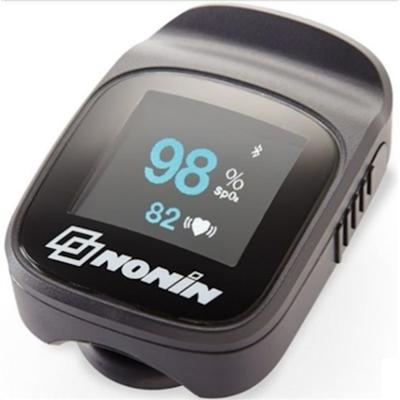
Nonin Medical NoninConnect™ Finger Pulse Oximeter with Bluetooth® Smart Wireless Technology""" NoninConnect™ Finger Pulse Oximeter with Bluetooth® Smart Wireless Technology for Clinicians and Patients — Nonin TruO2® OTC 3250 (OTC, No Prescription Required) The NoninConnect™ finger pulse oximeter is an over-the-counter (OTC) device , made..."299,00 $*Shipping: 0,00 $Secure redirect to the provider
-
Steelplay MetalTech Radian Wireless Gaming Headset - Wireless and Wired Connectivity, Detachable Microphone, Volume ControlsThe Steelplay MetalTech Radian wireless gaming headset offers flexible audio for gaming and everyday entertainment. It's designed for use across consoles, computers, and compatible mobile devices. You can connect wirelessly through the supplied low-latency USB-C dongle or use the detachable 3.5 mm braided cable for a wired connection. The headset features a comfortable, adaptable design with soft ear cushions and an adjustable padded headband for a secure fit during longer gaming, music, and film sessions. The detachable boom microphone supports in-game chat and can be removed when not required. Key features include wireless and wired connectivity, a supplied USB-C dongle for compatible devices, a detachable microphone for flexible voice chat, integrated volume and microphone controls, and a detachable 2 m braided 3.5 mm audio cable. The headset also includes a 1.5 m braided USB-C charging cable and is compatible with PS5, PS4, Nintendo Switch, PC, Mac, and compatible Android or iOS devices using the supplied dongle.26,99 £*Shipping: 3,95 £Secure redirect to the provider
-
On Spot Shop DC Wireless Remote Control Switch With Relay Output, RF Transmitter And Receiver For LED Lighting & Smart Device device With 1 RemoteReliable Control for Lighting & Automation Experience seamless control with the DC12V 8CH 8 Channel Wireless Remote Control LED Light Switch Relay Output Radio RF Transmitter and 315433 MHz Receiver. Designed for convenience, this system allows you...39,97 $*Shipping: 0,00 $Secure redirect to the provider



-
Why doesn't the Yeelight Lightstrip Plus work with Alexa?
The Yeelight Lightstrip Plus does not work with Alexa because it is not natively compatible with Amazon's voice assistant. The Lightstrip Plus uses the Yeelight app for control and does not have built-in support for Alexa. However, it may be possible to use a third-party integration or bridge device to connect the Lightstrip Plus to Alexa, but this would require additional setup and may not provide full functionality. **
-
Why is there no color change with Alexa on the Xiaomi Yeelight?
There is no color change with Alexa on the Xiaomi Yeelight because the Yeelight skill for Alexa does not currently support changing colors. The skill only allows for basic controls such as turning the light on or off, adjusting brightness, and changing color temperature. To change colors on the Xiaomi Yeelight, you would need to use the Yeelight app or other compatible smart home platforms that support color-changing capabilities. **
-
What is digital communication?
Digital communication refers to the exchange of information through electronic devices such as computers, smartphones, and tablets. It involves sending and receiving data in the form of text, images, videos, or audio over digital channels like email, social media, messaging apps, and websites. Digital communication allows for instant and efficient communication between individuals or groups regardless of geographical location, making it a vital aspect of modern-day interactions and business operations. **
-
How do I activate wireless connectivity in Windows 7?
To activate wireless connectivity in Windows 7, you can follow these steps: 1. Click on the Start button and then select Control Panel. 2. In the Control Panel, click on Network and Sharing Center. 3. In the Network and Sharing Center, click on the "Change adapter settings" option on the left-hand side. 4. Right-click on the wireless network connection and select "Enable" from the drop-down menu. Once you have completed these steps, your wireless connectivity should be activated and you should be able to connect to available wireless networks. **


Is the wireless communication WLAN disabled?
To determine if the wireless communication WLAN is disabled, you can check the settings on your device. Look for the WLAN or Wi-Fi settings and see if the option is turned off or disabled. Additionally, you can also check the physical hardware of your device to see if there is a manual switch or button to enable or disable the WLAN. If the WLAN is disabled, you can enable it through the settings or by using the physical switch or button. **
What is Digital Technology 2?
Digital Technology 2 is a course that builds upon the foundational concepts introduced in Digital Technology 1. It delves deeper into topics such as programming, web development, data analysis, and cybersecurity. Students will further develop their skills in using digital tools and technologies to solve real-world problems and gain a more advanced understanding of how technology impacts society. The course aims to prepare students for a career in the rapidly evolving field of digital technology. **
Top-Angebote
Products related to Yeelight:
-
Nonin Medical NoninConnect™ Finger Pulse Oximeter with Bluetooth® Smart Wireless Technology""" NoninConnect™ Finger Pulse Oximeter with Bluetooth® Smart Wireless Technology for Clinicians and Patients — Nonin TruO2® OTC 3250 (OTC, No Prescription Required) The NoninConnect™ finger pulse oximeter is an over-the-counter (OTC) device , made..."299,00 $*Shipping: 0,00 $Secure redirect to the provider
-
How can I change the network of the Yeelight Smart Bulb?
To change the network of the Yeelight Smart Bulb, you can follow these steps: 1. Open the Yeelight app on your smartphone and make sure it is connected to the same Wi-Fi network as the bulb. 2. Go to the "Devices" tab and select the Yeelight Smart Bulb you want to change the network for. 3. Tap on the settings icon and then select "Network settings" or "Wi-Fi settings" option. 4. Follow the on-screen instructions to connect the bulb to a new Wi-Fi network by entering the network name and password. 5. Once the bulb is successfully connected to the new network, you can control it using the Yeelight app from any device connected to the same network. **
-
How can I install an additional Yeelight ceiling lamp?
To install an additional Yeelight ceiling lamp, you will need to follow these steps: 1. Turn off the power to the existing ceiling light fixture at the circuit breaker. 2. Remove the existing ceiling light fixture by unscrewing the mounting screws and disconnecting the wires. 3. Install the mounting bracket for the new Yeelight ceiling lamp according to the manufacturer's instructions. 4. Connect the wires from the new Yeelight ceiling lamp to the corresponding wires in the ceiling, making sure to match the colors (e.g., black to black, white to white, etc.). 5. Secure the new Yeelight ceiling lamp to the mounting bracket and turn the power back on to test the installation. Always consult the installation manual provided by Yeelight for specific instructions and safety precautions. If you are not comfortable working with electrical wiring, it is best to hire a professional electrician for the installation. **
-
Why doesn't the Yeelight Lightstrip Plus work with Alexa?
The Yeelight Lightstrip Plus does not work with Alexa because it is not natively compatible with Amazon's voice assistant. The Lightstrip Plus uses the Yeelight app for control and does not have built-in support for Alexa. However, it may be possible to use a third-party integration or bridge device to connect the Lightstrip Plus to Alexa, but this would require additional setup and may not provide full functionality. **
-
Why is there no color change with Alexa on the Xiaomi Yeelight?
There is no color change with Alexa on the Xiaomi Yeelight because the Yeelight skill for Alexa does not currently support changing colors. The skill only allows for basic controls such as turning the light on or off, adjusting brightness, and changing color temperature. To change colors on the Xiaomi Yeelight, you would need to use the Yeelight app or other compatible smart home platforms that support color-changing capabilities. **
Similar search terms for Yeelight
-
Steelplay MetalTech Radian Wireless Gaming Headset - Wireless and Wired Connectivity, Detachable Microphone, Volume ControlsThe Steelplay MetalTech Radian wireless gaming headset offers flexible audio for gaming and everyday entertainment. It's designed for use across consoles, computers, and compatible mobile devices. You can connect wirelessly through the supplied low-latency USB-C dongle or use the detachable 3.5 mm braided cable for a wired connection. The headset features a comfortable, adaptable design with soft ear cushions and an adjustable padded headband for a secure fit during longer gaming, music, and film sessions. The detachable boom microphone supports in-game chat and can be removed when not required. Key features include wireless and wired connectivity, a supplied USB-C dongle for compatible devices, a detachable microphone for flexible voice chat, integrated volume and microphone controls, and a detachable 2 m braided 3.5 mm audio cable. The headset also includes a 1.5 m braided USB-C charging cable and is compatible with PS5, PS4, Nintendo Switch, PC, Mac, and compatible Android or iOS devices using the supplied dongle.26,99 £*Shipping: 3,95 £Secure redirect to the provider
-
On Spot Shop DC Wireless Remote Control Switch With Relay Output, RF Transmitter And Receiver For LED Lighting & Smart Device device With 1 RemoteReliable Control for Lighting & Automation Experience seamless control with the DC12V 8CH 8 Channel Wireless Remote Control LED Light Switch Relay Output Radio RF Transmitter and 315433 MHz Receiver. Designed for convenience, this system allows you...39,97 $*Shipping: 0,00 $Secure redirect to the provider
-
NextBase IQ 4K Smart Dash Cam – Latest December Update, Inbuilt Cabin Car Cam, 4G ConnectivityOverview: The Nextbase IQ 4K Smart Dash Cam combines ultra-high-definition recording with advanced safety and convenience features. With the latest December update, it offers enhanced live view capabilities, smart parking mode, witness mode, SOS response, and voice control. Equipped with inbuilt cabin camera and 4G connectivity, this dash cam ensures comprehensive vehicle and passenger monitoring, delivering peace of mind on every journey. Product Description: Capture every detail on the road with the Nextbase IQ 4K Smart Dash Cam. The 4K ultra HD recording provides crystal-clear video footage of your surroundings, while the inbuilt cabin camera monitors the interior of your vehicle. Stay connected with 4G for live viewing, instant notifications, and SOS emergency response. Smart parking mode protects your vehicle while parked, and witness mode offers crucial video evidence in the event of an incident. Voice control allows hands-free operation, making it safer and easier to use. The latest software update further improves performance and user experience. Key Features: Ultra-high-definition 4K recording for clear, detailed footage Inbuilt cabin camera for interior monitoring 4G connectivity for live view and instant notifications Smart parking mode to monitor your vehicle while parked Witness mode for capturing crucial incident evidence SOS response feature for emergency assistance Voice control for hands-free operation Latest December software update with enhanced features399,00 £*Shipping: 0,00 £Secure redirect to the provider
-
The Handy Homestead DIY Wooden Walkie Talkie Kit For Kids STEM Building Wireless Communication Toy DIY Wooden Walkie Talkie Kit For Kids STEM Building Wireless Communication ToySpark your childs I built this! moment with a handson project that turns curiosity into real play. This 2pcs DIY wooden walkie talkie kit lets kids assemble two working communication toys while exploring basic electronics, sound, and signal...54,97 $*Shipping: 0,00 $Secure redirect to the provider
-
What is digital communication?
Digital communication refers to the exchange of information through electronic devices such as computers, smartphones, and tablets. It involves sending and receiving data in the form of text, images, videos, or audio over digital channels like email, social media, messaging apps, and websites. Digital communication allows for instant and efficient communication between individuals or groups regardless of geographical location, making it a vital aspect of modern-day interactions and business operations. **
-
How do I activate wireless connectivity in Windows 7?
To activate wireless connectivity in Windows 7, you can follow these steps: 1. Click on the Start button and then select Control Panel. 2. In the Control Panel, click on Network and Sharing Center. 3. In the Network and Sharing Center, click on the "Change adapter settings" option on the left-hand side. 4. Right-click on the wireless network connection and select "Enable" from the drop-down menu. Once you have completed these steps, your wireless connectivity should be activated and you should be able to connect to available wireless networks. **
-
Is the wireless communication WLAN disabled?
To determine if the wireless communication WLAN is disabled, you can check the settings on your device. Look for the WLAN or Wi-Fi settings and see if the option is turned off or disabled. Additionally, you can also check the physical hardware of your device to see if there is a manual switch or button to enable or disable the WLAN. If the WLAN is disabled, you can enable it through the settings or by using the physical switch or button. **
-
What is Digital Technology 2?
Digital Technology 2 is a course that builds upon the foundational concepts introduced in Digital Technology 1. It delves deeper into topics such as programming, web development, data analysis, and cybersecurity. Students will further develop their skills in using digital tools and technologies to solve real-world problems and gain a more advanced understanding of how technology impacts society. The course aims to prepare students for a career in the rapidly evolving field of digital technology. **
* All prices are inclusive of VAT and, if applicable, plus shipping costs. The offer information is based on the details provided by the respective shop and is updated through automated processes. Real-time updates do not occur, so deviations can occur in individual cases. ** Note: Parts of this content were created by AI.