Buy allphone.eu ?
We are moving the project
allphone.eu .
Are you interested in purchasing the domain
allphone.eu ?
domain@kv-gmbh.de · 0541-91531010
Buy allphone.eu ?
Is the TP-Link device defective after the firmware update?
It is difficult to determine if the TP-Link device is defective after the firmware update without more information. If the device is not functioning properly or experiencing issues after the update, it could be due to a defective firmware update or compatibility issues. It is recommended to troubleshoot the device, contact TP-Link customer support for assistance, or consider rolling back to a previous firmware version if possible. **
Is this a custom firmware?
Without more specific information, it is difficult to determine if the firmware in question is custom or not. Custom firmware is typically developed and modified by individuals or third-party developers to add new features or functionality to a device. If the firmware has been modified from the original manufacturer's version, then it could be considered custom. However, without more details about the firmware in question, it is hard to definitively say whether it is custom or not. **


Similar search terms for Firmware
Top-Angebote
Products related to Firmware:
-
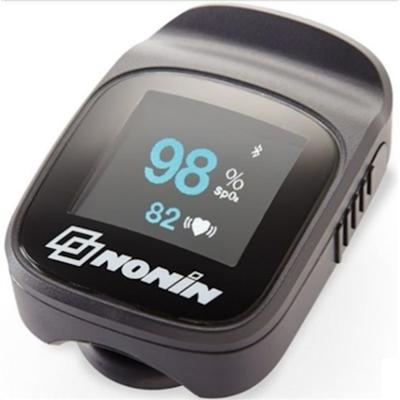
Nonin Medical NoninConnect™ Finger Pulse Oximeter with Bluetooth® Smart Wireless Technology""" NoninConnect™ Finger Pulse Oximeter with Bluetooth® Smart Wireless Technology for Clinicians and Patients — Nonin TruO2® OTC 3250 (OTC, No Prescription Required) The NoninConnect™ finger pulse oximeter is an over-the-counter (OTC) device , made..."299,00 $*Shipping: 0,00 $Secure redirect to the provider



-
What is the firmware kernel?
The firmware kernel is the core component of the firmware of a device, such as a computer or a smartphone. It is responsible for managing the hardware resources of the device and providing a bridge between the hardware and the higher-level software. The firmware kernel is essential for the proper functioning of the device and is often updated by the manufacturer to fix bugs, improve performance, and add new features. It is a crucial part of the device's operating system and plays a key role in ensuring the device's stability and security. **
-
What is the Huawei firmware?
The Huawei firmware is the software that is embedded in Huawei devices, such as smartphones, tablets, and routers. It is the operating system that controls the device's hardware and allows it to function. The firmware includes the device's user interface, system settings, and pre-installed applications. It is essential for the proper functioning of the device and can be updated by the manufacturer to fix bugs, improve performance, and add new features. **
-
How do I install Custom Firmware (CFW) on the New 3DS XL with firmware version 11.13?
To install Custom Firmware (CFW) on the New 3DS XL with firmware version 11.13, you will need to use a method called Seedminer. This method involves using a hacked 3DS to extract the movable.sed file from the target 3DS, and then using it to generate the necessary files for CFW installation. You will also need a compatible SD card and a computer to complete the process. It's important to note that installing CFW on your 3DS may void your warranty and can potentially lead to system instability or bricking, so proceed with caution and at your own risk. **
-
Does the system firmware need an update?
It is recommended to periodically check for updates to the system firmware to ensure that the device is running efficiently and securely. Firmware updates often include bug fixes, performance improvements, and security patches that can enhance the overall functionality of the device. Keeping the system firmware up to date can help prevent potential vulnerabilities and ensure compatibility with the latest software and hardware. **


Is the iPhone firmware file not compatible?
If the iPhone firmware file is not compatible, it may result in issues such as the device not functioning properly, errors during the update process, or the device becoming stuck in a boot loop. It is important to ensure that the firmware file is specifically designed for your iPhone model and version to avoid compatibility issues. If you encounter compatibility issues, you may need to find the correct firmware file for your device or seek assistance from Apple support. **
How can I reinstall the PS3 firmware?
To reinstall the PS3 firmware, you will need to download the latest firmware update from the official PlayStation website onto a USB drive. Make sure the USB drive is formatted to FAT32. Create a folder on the USB drive called "PS3" and inside that folder, create another folder called "UPDATE". Place the downloaded firmware update file into the "UPDATE" folder. Then, insert the USB drive into the PS3 and go to the Settings menu. From there, select System Update and choose Update via Storage Media. The PS3 will then reinstall the firmware using the update file on the USB drive. **
Top-Angebote
Products related to Firmware:
-
Uplift Picks PS4 USB Tool Firmware Support Device PlayStation 4 Console Accessory PS4 USB Tool Firmware Support Device PlayStation 4 Console AccessorySimplify your console setup with this reliable PS4 USB tool designed for smooth compatibility and ease of use. Built for gamers and tech users, this PS4 firmware support device works with supported system versions to enhance functionality. Its...33,99 $*Shipping: 0,00 $Secure redirect to the provider
-
Inspire Essentials PS4 Firmware Support Game Accessory Tool PS4 Firmware Support Game Accessory ToolUnlock more flexibility and compatibility for your console setup with this advanced PS4 accessory tool designed to support firmware versions from 9.0 through 12.52. Built for gamers and tech enthusiasts, this compact PS4 support device offers a...34,98 $*Shipping: 0,00 $Secure redirect to the provider
-
Is the TP-Link device defective after the firmware update?
It is difficult to determine if the TP-Link device is defective after the firmware update without more information. If the device is not functioning properly or experiencing issues after the update, it could be due to a defective firmware update or compatibility issues. It is recommended to troubleshoot the device, contact TP-Link customer support for assistance, or consider rolling back to a previous firmware version if possible. **
-
Is this a custom firmware?
Without more specific information, it is difficult to determine if the firmware in question is custom or not. Custom firmware is typically developed and modified by individuals or third-party developers to add new features or functionality to a device. If the firmware has been modified from the original manufacturer's version, then it could be considered custom. However, without more details about the firmware in question, it is hard to definitively say whether it is custom or not. **
-
What is the firmware kernel?
The firmware kernel is the core component of the firmware of a device, such as a computer or a smartphone. It is responsible for managing the hardware resources of the device and providing a bridge between the hardware and the higher-level software. The firmware kernel is essential for the proper functioning of the device and is often updated by the manufacturer to fix bugs, improve performance, and add new features. It is a crucial part of the device's operating system and plays a key role in ensuring the device's stability and security. **
-
What is the Huawei firmware?
The Huawei firmware is the software that is embedded in Huawei devices, such as smartphones, tablets, and routers. It is the operating system that controls the device's hardware and allows it to function. The firmware includes the device's user interface, system settings, and pre-installed applications. It is essential for the proper functioning of the device and can be updated by the manufacturer to fix bugs, improve performance, and add new features. **
Similar search terms for Firmware
-
Nonin Medical NoninConnect™ Finger Pulse Oximeter with Bluetooth® Smart Wireless Technology""" NoninConnect™ Finger Pulse Oximeter with Bluetooth® Smart Wireless Technology for Clinicians and Patients — Nonin TruO2® OTC 3250 (OTC, No Prescription Required) The NoninConnect™ finger pulse oximeter is an over-the-counter (OTC) device , made..."299,00 $*Shipping: 0,00 $Secure redirect to the provider
-
Steelplay MetalTech Radian Wireless Gaming Headset - Wireless and Wired Connectivity, Detachable Microphone, Volume ControlsThe Steelplay MetalTech Radian wireless gaming headset offers flexible audio for gaming and everyday entertainment. It's designed for use across consoles, computers, and compatible mobile devices. You can connect wirelessly through the supplied low-latency USB-C dongle or use the detachable 3.5 mm braided cable for a wired connection. The headset features a comfortable, adaptable design with soft ear cushions and an adjustable padded headband for a secure fit during longer gaming, music, and film sessions. The detachable boom microphone supports in-game chat and can be removed when not required. Key features include wireless and wired connectivity, a supplied USB-C dongle for compatible devices, a detachable microphone for flexible voice chat, integrated volume and microphone controls, and a detachable 2 m braided 3.5 mm audio cable. The headset also includes a 1.5 m braided USB-C charging cable and is compatible with PS5, PS4, Nintendo Switch, PC, Mac, and compatible Android or iOS devices using the supplied dongle.26,99 £*Shipping: 3,95 £Secure redirect to the provider
-
On Spot Shop DC Wireless Remote Control Switch With Relay Output, RF Transmitter And Receiver For LED Lighting & Smart Device device With 1 RemoteReliable Control for Lighting & Automation Experience seamless control with the DC12V 8CH 8 Channel Wireless Remote Control LED Light Switch Relay Output Radio RF Transmitter and 315433 MHz Receiver. Designed for convenience, this system allows you...39,97 $*Shipping: 0,00 $Secure redirect to the provider
-
How do I install Custom Firmware (CFW) on the New 3DS XL with firmware version 11.13?
To install Custom Firmware (CFW) on the New 3DS XL with firmware version 11.13, you will need to use a method called Seedminer. This method involves using a hacked 3DS to extract the movable.sed file from the target 3DS, and then using it to generate the necessary files for CFW installation. You will also need a compatible SD card and a computer to complete the process. It's important to note that installing CFW on your 3DS may void your warranty and can potentially lead to system instability or bricking, so proceed with caution and at your own risk. **
-
Does the system firmware need an update?
It is recommended to periodically check for updates to the system firmware to ensure that the device is running efficiently and securely. Firmware updates often include bug fixes, performance improvements, and security patches that can enhance the overall functionality of the device. Keeping the system firmware up to date can help prevent potential vulnerabilities and ensure compatibility with the latest software and hardware. **
-
Is the iPhone firmware file not compatible?
If the iPhone firmware file is not compatible, it may result in issues such as the device not functioning properly, errors during the update process, or the device becoming stuck in a boot loop. It is important to ensure that the firmware file is specifically designed for your iPhone model and version to avoid compatibility issues. If you encounter compatibility issues, you may need to find the correct firmware file for your device or seek assistance from Apple support. **
-
How can I reinstall the PS3 firmware?
To reinstall the PS3 firmware, you will need to download the latest firmware update from the official PlayStation website onto a USB drive. Make sure the USB drive is formatted to FAT32. Create a folder on the USB drive called "PS3" and inside that folder, create another folder called "UPDATE". Place the downloaded firmware update file into the "UPDATE" folder. Then, insert the USB drive into the PS3 and go to the Settings menu. From there, select System Update and choose Update via Storage Media. The PS3 will then reinstall the firmware using the update file on the USB drive. **
* All prices are inclusive of VAT and, if applicable, plus shipping costs. The offer information is based on the details provided by the respective shop and is updated through automated processes. Real-time updates do not occur, so deviations can occur in individual cases. ** Note: Parts of this content were created by AI.