Buy allphone.eu ?
We are moving the project
allphone.eu .
Are you interested in purchasing the domain
allphone.eu ?
domain@kv-gmbh.de · 0541-91531010
Buy allphone.eu ?
Why is the switch not working in the dock station anymore?
The switch may not be working in the dock station anymore due to a variety of reasons. It could be a hardware issue such as a faulty connection or a damaged switch mechanism. Alternatively, it could be a software issue such as a glitch or a compatibility problem with the dock station. It is recommended to troubleshoot the switch, check for any physical damage, and ensure that the software and firmware are up to date to determine the exact cause of the malfunction. **
What is a dock on a mobile phone?
A dock on a mobile phone is a physical or virtual interface that allows the user to connect their phone to other devices or accessories. It typically provides a secure place for the phone to sit while charging, syncing data, or connecting to external displays or speakers. Some docks also offer additional features such as fast charging, data transfer, and adjustable viewing angles. Docks can come in various forms, including a standalone accessory, a built-in feature on a charging station, or a software interface on the phone's screen. **


Similar search terms for Asus-Dock-Station-Simpro
Top-Angebote
Products related to Asus-Dock-Station-Simpro:
-
Anker MagGo Wireless Charging Station (3-in-1, Dock Stand)Ultra-Fast 15W Wireless Charging: Harness full 15W charging power, giving your essential devices the quickest charge, consistent with the original MagSafe technology. Compact Charging for 3 Devices: Ideal for clutter-free workspaces, this compact charger fits ideally on any desk, powering everything from phones to watches. Certified Fast Charging for Apple Watch: Boasts official certification, enabling you to power your Apple Watch Series 10 from 0 to 100% in just 1 hour and 13 minutes. (Note: Data based on internal lab testing; actual charging times may vary.) Set Your Preferred Angle: Adjust vertically up to 45 degrees to find your optimal charging view and enjoy StandBy mode in landscape orientation. What You Get: Anker MagGo Wireless Charging Station (3-in-1, Dock Stand), 40W USB-C adapter, 1.5 m USB-C to USB-C cable, welcome guide, 24-month warranty, and our friendly customer service.79,99 £*Shipping: 0,00 £Secure redirect to the provider
-
Dell Pro Thunderbolt 4 Smart Dock SD25TB4 USB-C Docking Station, NewOverview Create a cleaner, faster and more powerful workstation with the Dell Pro Thunderbolt 4 Smart Dock SD25TB4. Designed for professionals, hybrid workers, IT teams and high-performance desk setups, this premium USB-C docking station gives you 130W charging for compatible Dell systems, Thunderbolt 4 connectivity, multi-display support, fast USB expansion, 2.5GbE networking and enterprise-friendly management features in one compact hub. Whether you are connecting monitors, peripherals, wired internet, storage drives or accessories, it turns your laptop into a full desktop setup with one simple connection. Key Features & Benefits One-Cable Desk Setup – Connect your laptop to monitors, keyboard, mouse, Ethernet, USB accessories and power through one dock, helping reduce cable clutter and simplify your workspace. Powerful Laptop Charging – Delivers up to 130W power delivery for compatible Dell systems and up to 96W for non-Dell systems, helping keep your laptop charged while you work. Dell lists USB Power Delivery at 130W for Dell systems and 96W for non-Dell systems. Thunderbolt 4 Performance – Thunderbolt 4 connectivity gives you high-speed data, display and power support, making it ideal for modern business laptops and professional workstations. Multi-Display Productivity – Supports multiple external displays for easier multitasking, spreadsheets, dashboards, creative work and office productivity. Dell lists supported configurations including 4 x QHD at 60Hz, 3 x WQHD at 60Hz, 2 x 4K at 60Hz and 1 x 5K WUHD at 60Hz. Wide Video Connectivity – Includes 2 x DisplayPort 1.4, 1 x HDMI 2.1, 1 x USB-C DisplayPort 1.4 multi-function port and 2 x Thunderbolt 4 ports, giving you flexible display and accessory options. Fast Wired Networking – The built-in RJ45 Ethernet port supports 2.5GbE, giving you faster and more stable wired network performance for large downloads, cloud work, video calls and office environments. Plenty of USB Expansion – Connect everyday accessories using multiple USB ports, including 4 x USB-A 3.2 Gen 2 and 1 x USB-C 3.2 Gen 2, ideal for keyboards, mice, storage drives, webcams, headsets and other desk equipment. Smart Management for Business IT – Supports enterprise management features such as MAC address pass-through and Intel AMT over Thunderbolt with selected Intel vPro PCs, helping IT teams manage devices more efficiently. Wi-Fi Management Support – Designed for managed business environments, helping support smoother network control and device administration when used with compatible systems. Eco-Conscious Design – Built with a modern, business-ready design and sustainability-focused positioning, making it suitable for organisations that value performance and responsible purchasing. Why Choose This Product The Dell Pro Thunderbolt 4 Smart Dock SD25TB4 is ideal for users who want a professional docking station that does more than basic connectivity. It combines high-power charging, Thunderbolt 4 speed, flexible display support...269,00 £*Shipping: 0,00 £Secure redirect to the provider
-
Anker Prime Wireless Charging Station (3-in-1, MagGo, AirCool, Dock Stand)25W Qi2.2 Ultra‑Fast Wireless Charging: Powered by 25W Qi2.2 ultra-fast charging, your iPhone 18 Pro charges to 50% in just 28 minutes—up to 4.6 × faster than standard 5W wireless chargers. Enjoy the wireless speed you've been waiting for...132,99 $*Shipping: 0,00 $Secure redirect to the provider
-
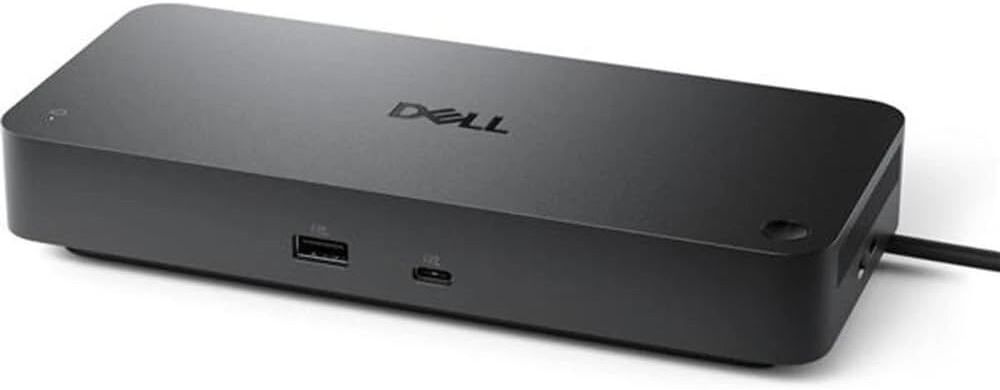
Dell Pro Dock WD25 USB-C Docking StationDescription The Dell Pro Dock WD25 is a professional USB-C docking station designed to simplify connectivity and expand the capabilities of compatible laptops and notebooks. It allows multiple peripherals, displays, network connections and accessories to be connected through a single USB-C connection to the host computer. The WD25 supports up to 100W power delivery to compatible Dell systems and up to 96W to compatible non-Dell systems. It is supplied with a 130W AC power adapter, providing power to the dock while simultaneously charging a compatible connected notebook. The docking station provides a comprehensive selection of display outputs, including two DisplayPort 1.4 ports, one HDMI 2.1 port and one USB-C 3.2 Gen 2 multifunction DisplayPort 1.4 port. Depending on the connected computer and display configuration, the dock can support up to four external displays. With DisplayPort 1.4 and Display Stream Compression, the WD25 can support configurations including multiple WQHD displays, dual 5K displays or a single 6K display at 60Hz. Without Display Stream Compression, supported configurations include up to four SXGA displays, three Full HD displays, two QHD displays or one 4K display at 60Hz. For high-speed peripherals and storage devices, the dock features four USB-A 3.2 Gen 2 ports and one USB-C 3.2 Gen 2 data port, with data transfer speeds of up to 10Gbps. Additional USB ports provide power to connected accessories even when the host computer is disconnected. The integrated RJ45 Ethernet port supports 2.5 Gigabit Ethernet, providing a fast wired network connection for compatible computers. The WD25 also supports features such as MAC address pass-through, PXE boot, Wake-on-LAN, WLAN-to-LAN switching and Dock Power Button Sync on compatible systems. The WD25 connects to compatible computers through USB Type-C with DisplayPort Alt Mode. It is compatible with USB-C computers and compatible Thunderbolt systems that support the required display and power-delivery functions. The docking station also provides firmware management and port-management capabilities, making it suitable for professional and business environments. Supported operating systems include Windows 10, Windows 11, Ubuntu, Red Hat Enterprise Linux and ChromeOS. Its compact 205mm x 90mm x 35.25mm design and 550g dock weight make it suitable for desk-based workstation setups. A 0.9m docking cable is provided, along with the power adapter, power cord and documentation.135,99 £*Shipping: 0,00 £Secure redirect to the provider



-
Does Apple's Lightning Dock have a digital-to-analog converter?
No, Apple's Lightning Dock does not have a built-in digital-to-analog converter. The Lightning Dock is primarily used for charging and syncing iOS devices with a Lightning connector. If you need to convert digital audio to analog, you would need a separate adapter or device that includes a digital-to-analog converter. **
-
Which company uses the Märklin Digital technology in a terminal station?
The company that uses the Märklin Digital technology in a terminal station is the German model railway manufacturer, Märklin. Märklin Digital technology allows for the control of multiple trains on the same track, as well as the ability to control various accessories and lighting. This technology is popular among model railway enthusiasts for its advanced features and capabilities. **
-
Is the iPhone dock buggy?
The iPhone dock can sometimes be buggy, with users reporting issues such as the phone not charging properly, the dock not recognizing the phone, or the phone getting stuck in the dock. These issues can be frustrating for users and may require troubleshooting or even replacement of the dock. It's important to keep the dock and phone software updated to minimize these issues. **
-
Can you operate a Switch Dock with a mobile phone charger?
No, you cannot operate a Switch Dock with a mobile phone charger. The Switch Dock requires a power adapter that outputs at least 15V/2.6A to function properly. Most mobile phone chargers output at a much lower voltage and amperage, which would not be sufficient to power the Switch Dock. Using a mobile phone charger with the Switch Dock could potentially damage the Dock or the Switch itself. It is important to use the proper power adapter that is specifically designed for the Switch Dock. **


Can a Switch Dock be operated with a mobile phone charger?
No, a Switch Dock cannot be operated with a mobile phone charger. The Switch Dock requires a specific power adapter that is designed to provide the necessary power and output for the Nintendo Switch console. Using a mobile phone charger may not provide the correct power output and could potentially damage the Switch Dock or the console. It is always recommended to use the official power adapter provided by Nintendo for the Switch Dock. **
How can I connect my Asus laptop to a wireless Bluetooth device, such as headphones?
To connect your Asus laptop to a wireless Bluetooth device, such as headphones, you will first need to make sure that your laptop has Bluetooth capability. You can usually do this by checking the settings or looking for a Bluetooth icon on your laptop. Once you have confirmed that your laptop has Bluetooth, turn on the Bluetooth on your headphones and set them to pairing mode. On your laptop, go to the Bluetooth settings, search for available devices, and select your headphones to pair them. Follow any on-screen instructions to complete the pairing process, and once connected, you should be able to use your headphones with your Asus laptop wirelessly. **
Top-Angebote
Products related to Asus-Dock-Station-Simpro:
-
Asus Dock Station Simpro Dock 2 Docking StationDescription Ideal for users who need a practical docking station for their computer setup, the Asus Dock Station Simpro Dock 2 provides a convenient way to connect and organise compatible equipment in one place. Its straightforward design makes it suitable for home working, office use and everyday desktop arrangements. The docking station features HDMI connectivity, helping users connect their setup through a familiar display connection. It is designed with a durable construction and presented as a high-quality accessory, while its standard size allows it to fit naturally into a range of working environments. Measuring 15.0 x 15.0 x 20.0 cm and weighing 200 g, the Simpro Dock 2 is a compact addition to a desk or workstation. One item is supplied, with the product available in various colours. An essential addition for users seeking a durable, HDMI-equipped docking station for their computer workspace.160,99 £*Shipping: 0,00 £Secure redirect to the provider
-
United Nintendo Switch Controller Charger Magnetic Charging Dock Station Nintendo Switch Controller Charger Magnetic Charging Dock StationExperience hasslefree gaming with the Nintendo Switch 2 controller charger that keeps your controllers powered and organized in one place. Designed for Switch 2 players, this magnetic charging dock securely charges up to four controllers at once for...39,97 $*Shipping: 0,00 $Secure redirect to the provider
-
Anker MagGo Wireless Charging Station (3-in-1, Dock Stand)Ultra-Fast 15W Wireless Charging: Harness full 15W charging power, giving your essential devices the quickest charge, consistent with the original MagSafe technology. Compact Charging for 3 Devices: Ideal for clutter-free workspaces, this compact charger fits ideally on any desk, powering everything from phones to watches. Certified Fast Charging for Apple Watch: Boasts official certification, enabling you to power your Apple Watch Series 10 from 0 to 100% in just 1 hour and 13 minutes. (Note: Data based on internal lab testing; actual charging times may vary.) Set Your Preferred Angle: Adjust vertically up to 45 degrees to find your optimal charging view and enjoy StandBy mode in landscape orientation. What You Get: Anker MagGo Wireless Charging Station (3-in-1, Dock Stand), 40W USB-C adapter, 1.5 m USB-C to USB-C cable, welcome guide, 24-month warranty, and our friendly customer service.79,99 £*Shipping: 0,00 £Secure redirect to the provider
-
Dell Pro Thunderbolt 4 Smart Dock SD25TB4 USB-C Docking Station, NewOverview Create a cleaner, faster and more powerful workstation with the Dell Pro Thunderbolt 4 Smart Dock SD25TB4. Designed for professionals, hybrid workers, IT teams and high-performance desk setups, this premium USB-C docking station gives you 130W charging for compatible Dell systems, Thunderbolt 4 connectivity, multi-display support, fast USB expansion, 2.5GbE networking and enterprise-friendly management features in one compact hub. Whether you are connecting monitors, peripherals, wired internet, storage drives or accessories, it turns your laptop into a full desktop setup with one simple connection. Key Features & Benefits One-Cable Desk Setup – Connect your laptop to monitors, keyboard, mouse, Ethernet, USB accessories and power through one dock, helping reduce cable clutter and simplify your workspace. Powerful Laptop Charging – Delivers up to 130W power delivery for compatible Dell systems and up to 96W for non-Dell systems, helping keep your laptop charged while you work. Dell lists USB Power Delivery at 130W for Dell systems and 96W for non-Dell systems. Thunderbolt 4 Performance – Thunderbolt 4 connectivity gives you high-speed data, display and power support, making it ideal for modern business laptops and professional workstations. Multi-Display Productivity – Supports multiple external displays for easier multitasking, spreadsheets, dashboards, creative work and office productivity. Dell lists supported configurations including 4 x QHD at 60Hz, 3 x WQHD at 60Hz, 2 x 4K at 60Hz and 1 x 5K WUHD at 60Hz. Wide Video Connectivity – Includes 2 x DisplayPort 1.4, 1 x HDMI 2.1, 1 x USB-C DisplayPort 1.4 multi-function port and 2 x Thunderbolt 4 ports, giving you flexible display and accessory options. Fast Wired Networking – The built-in RJ45 Ethernet port supports 2.5GbE, giving you faster and more stable wired network performance for large downloads, cloud work, video calls and office environments. Plenty of USB Expansion – Connect everyday accessories using multiple USB ports, including 4 x USB-A 3.2 Gen 2 and 1 x USB-C 3.2 Gen 2, ideal for keyboards, mice, storage drives, webcams, headsets and other desk equipment. Smart Management for Business IT – Supports enterprise management features such as MAC address pass-through and Intel AMT over Thunderbolt with selected Intel vPro PCs, helping IT teams manage devices more efficiently. Wi-Fi Management Support – Designed for managed business environments, helping support smoother network control and device administration when used with compatible systems. Eco-Conscious Design – Built with a modern, business-ready design and sustainability-focused positioning, making it suitable for organisations that value performance and responsible purchasing. Why Choose This Product The Dell Pro Thunderbolt 4 Smart Dock SD25TB4 is ideal for users who want a professional docking station that does more than basic connectivity. It combines high-power charging, Thunderbolt 4 speed, flexible display support...269,00 £*Shipping: 0,00 £Secure redirect to the provider
-
Why is the switch not working in the dock station anymore?
The switch may not be working in the dock station anymore due to a variety of reasons. It could be a hardware issue such as a faulty connection or a damaged switch mechanism. Alternatively, it could be a software issue such as a glitch or a compatibility problem with the dock station. It is recommended to troubleshoot the switch, check for any physical damage, and ensure that the software and firmware are up to date to determine the exact cause of the malfunction. **
-
What is a dock on a mobile phone?
A dock on a mobile phone is a physical or virtual interface that allows the user to connect their phone to other devices or accessories. It typically provides a secure place for the phone to sit while charging, syncing data, or connecting to external displays or speakers. Some docks also offer additional features such as fast charging, data transfer, and adjustable viewing angles. Docks can come in various forms, including a standalone accessory, a built-in feature on a charging station, or a software interface on the phone's screen. **
-
Does Apple's Lightning Dock have a digital-to-analog converter?
No, Apple's Lightning Dock does not have a built-in digital-to-analog converter. The Lightning Dock is primarily used for charging and syncing iOS devices with a Lightning connector. If you need to convert digital audio to analog, you would need a separate adapter or device that includes a digital-to-analog converter. **
-
Which company uses the Märklin Digital technology in a terminal station?
The company that uses the Märklin Digital technology in a terminal station is the German model railway manufacturer, Märklin. Märklin Digital technology allows for the control of multiple trains on the same track, as well as the ability to control various accessories and lighting. This technology is popular among model railway enthusiasts for its advanced features and capabilities. **
Similar search terms for Asus-Dock-Station-Simpro
-
Anker Prime Wireless Charging Station (3-in-1, MagGo, AirCool, Dock Stand)25W Qi2.2 Ultra‑Fast Wireless Charging: Powered by 25W Qi2.2 ultra-fast charging, your iPhone 18 Pro charges to 50% in just 28 minutes—up to 4.6 × faster than standard 5W wireless chargers. Enjoy the wireless speed you've been waiting for...132,99 $*Shipping: 0,00 $Secure redirect to the provider
-
Dell Pro Dock WD25 USB-C Docking StationDescription The Dell Pro Dock WD25 is a professional USB-C docking station designed to simplify connectivity and expand the capabilities of compatible laptops and notebooks. It allows multiple peripherals, displays, network connections and accessories to be connected through a single USB-C connection to the host computer. The WD25 supports up to 100W power delivery to compatible Dell systems and up to 96W to compatible non-Dell systems. It is supplied with a 130W AC power adapter, providing power to the dock while simultaneously charging a compatible connected notebook. The docking station provides a comprehensive selection of display outputs, including two DisplayPort 1.4 ports, one HDMI 2.1 port and one USB-C 3.2 Gen 2 multifunction DisplayPort 1.4 port. Depending on the connected computer and display configuration, the dock can support up to four external displays. With DisplayPort 1.4 and Display Stream Compression, the WD25 can support configurations including multiple WQHD displays, dual 5K displays or a single 6K display at 60Hz. Without Display Stream Compression, supported configurations include up to four SXGA displays, three Full HD displays, two QHD displays or one 4K display at 60Hz. For high-speed peripherals and storage devices, the dock features four USB-A 3.2 Gen 2 ports and one USB-C 3.2 Gen 2 data port, with data transfer speeds of up to 10Gbps. Additional USB ports provide power to connected accessories even when the host computer is disconnected. The integrated RJ45 Ethernet port supports 2.5 Gigabit Ethernet, providing a fast wired network connection for compatible computers. The WD25 also supports features such as MAC address pass-through, PXE boot, Wake-on-LAN, WLAN-to-LAN switching and Dock Power Button Sync on compatible systems. The WD25 connects to compatible computers through USB Type-C with DisplayPort Alt Mode. It is compatible with USB-C computers and compatible Thunderbolt systems that support the required display and power-delivery functions. The docking station also provides firmware management and port-management capabilities, making it suitable for professional and business environments. Supported operating systems include Windows 10, Windows 11, Ubuntu, Red Hat Enterprise Linux and ChromeOS. Its compact 205mm x 90mm x 35.25mm design and 550g dock weight make it suitable for desk-based workstation setups. A 0.9m docking cable is provided, along with the power adapter, power cord and documentation.135,99 £*Shipping: 0,00 £Secure redirect to the provider
-
HP Thunderbolt 4 100W G6 Dock Docking Station - GreyDescription HP Thunderbolt 4 100W G6 Dock is a docking station designed for users who need a practical way to connect compatible equipment through a single desktop accessory. Its grey finish and compact form make it suitable for organised workspace setups. The dock provides two DisplayPort connections, one HDMI connection and one Thunderbolt 4 connection, giving users a range of connection options for supported displays and devices. It has a stated power rating of 100 W and includes a 1000 mm cable for convenient positioning. With dimensions stated as 120 x 120 mm and an item weight of 1.50 kg, this docking station is designed for use at a desk or workstation. An essential addition for users looking to expand their available connections with a dedicated docking station.178,99 £*Shipping: 0,00 £Secure redirect to the provider
-
Anker MagGo Wireless Charging Station (3-in-1, Dock Stand)Ultra-Fast 15W Wireless Charging: Harness full 15W charging power, giving your essential devices the quickest charge, consistent with the original MagSafe technology. Compact Charging for 3 Devices: Ideal for clutter-free workspaces, this compact...71,99 $*Shipping: 0,00 $Secure redirect to the provider
-
Is the iPhone dock buggy?
The iPhone dock can sometimes be buggy, with users reporting issues such as the phone not charging properly, the dock not recognizing the phone, or the phone getting stuck in the dock. These issues can be frustrating for users and may require troubleshooting or even replacement of the dock. It's important to keep the dock and phone software updated to minimize these issues. **
-
Can you operate a Switch Dock with a mobile phone charger?
No, you cannot operate a Switch Dock with a mobile phone charger. The Switch Dock requires a power adapter that outputs at least 15V/2.6A to function properly. Most mobile phone chargers output at a much lower voltage and amperage, which would not be sufficient to power the Switch Dock. Using a mobile phone charger with the Switch Dock could potentially damage the Dock or the Switch itself. It is important to use the proper power adapter that is specifically designed for the Switch Dock. **
-
Can a Switch Dock be operated with a mobile phone charger?
No, a Switch Dock cannot be operated with a mobile phone charger. The Switch Dock requires a specific power adapter that is designed to provide the necessary power and output for the Nintendo Switch console. Using a mobile phone charger may not provide the correct power output and could potentially damage the Switch Dock or the console. It is always recommended to use the official power adapter provided by Nintendo for the Switch Dock. **
-
How can I connect my Asus laptop to a wireless Bluetooth device, such as headphones?
To connect your Asus laptop to a wireless Bluetooth device, such as headphones, you will first need to make sure that your laptop has Bluetooth capability. You can usually do this by checking the settings or looking for a Bluetooth icon on your laptop. Once you have confirmed that your laptop has Bluetooth, turn on the Bluetooth on your headphones and set them to pairing mode. On your laptop, go to the Bluetooth settings, search for available devices, and select your headphones to pair them. Follow any on-screen instructions to complete the pairing process, and once connected, you should be able to use your headphones with your Asus laptop wirelessly. **
* All prices are inclusive of VAT and, if applicable, plus shipping costs. The offer information is based on the details provided by the respective shop and is updated through automated processes. Real-time updates do not occur, so deviations can occur in individual cases. ** Note: Parts of this content were created by AI.