Buy allphone.eu ?
We are moving the project
allphone.eu .
Are you interested in purchasing the domain
allphone.eu ?
domain@kv-gmbh.de · 0541-91531010
Buy allphone.eu ?
Which mobile device has a 35mm aux port for recording?
The mobile device that has a 35mm aux port for recording is the iPhone. The iPhone has a 3.5mm headphone jack that can be used for recording audio using an external microphone or other audio input device. This feature allows users to easily connect professional-grade microphones or other audio equipment to their iPhone for high-quality recording. **
Is the mobile phone charging port broken?
To determine if the mobile phone charging port is broken, you can try using a different charging cable and power adapter to see if the phone charges. If the phone still does not charge, the issue may be with the charging port. You can also inspect the charging port for any physical damage or debris that may be obstructing the connection. If you are unable to resolve the issue on your own, it may be best to consult a professional technician for further assistance. **


Similar search terms for Port
Top-Angebote
Products related to Port:
-
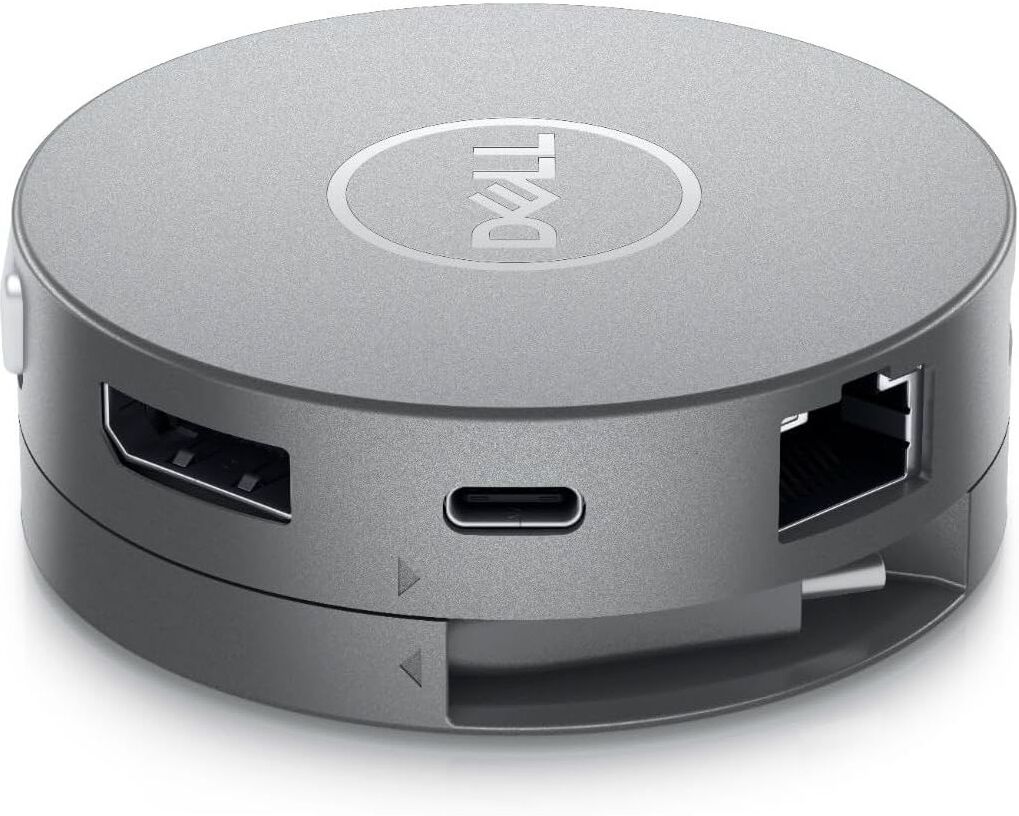
Dell Da310 Usb-C Mobile Adapter 6 Port Multi Hub, NewOverview Turn a single USB-C connection into a complete mobile workstation with the Dell DA310 USB-C Mobile Adapter 7-in-1 Multiport Hub . Compact enough to carry with your laptop yet versatile enough for a full desk setup, the DA310 gives you access to HDMI, DisplayPort, VGA, USB-C, dual USB-A and Gigabit Ethernet from one convenient adapter. Whether you're connecting to a presentation display, transferring files from an external drive, plugging into wired networking or powering your laptop through USB-C, the DA310 helps reduce the number of individual adapters you need to carry. UPC / EAN: 884116383482 Key Features & Benefits Turn One USB-C Port into Seven Useful Connections – The DA310 combines display, network and USB connectivity in one compact adapter, helping keep your desk and travel bag free from multiple separate dongles. Connect to Modern 4K Displays Through HDMI – The HDMI 2.0 port supports resolutions up to 3840 × 2160 at 60Hz when used with a compatible system and display, giving presentations, video and productivity work sharp 4K detail. Use DisplayPort for High-Resolution Monitors – A dedicated DisplayPort 1.4 connection also supports up to 4K at 60Hz , giving you flexibility when connecting professional monitors and compatible displays. Stay Compatible with Older Displays and Projectors – The built-in VGA output supports up to 1920 × 1080 at 60Hz , making the DA310 particularly useful in offices, meeting rooms and classrooms where older projectors are still in service. Connect a Display Through USB-C – The multifunction USB-C port can output video at up to 3840 × 2160 at 30Hz , as well as provide USB data and compatible power-delivery functionality. Transfer Files at Up to 10Gbps – Two USB-A 3.2 Gen 2 ports and the downstream USB-C connection support data rates up to 10Gbps , helping compatible SSDs, flash drives and peripherals transfer data quickly. Get Reliable Wired Internet Without a Dedicated Laptop Ethernet Port – The integrated Gigabit Ethernet RJ45 port lets you connect directly to wired networks, ideal for office environments, large downloads and situations where Wi-Fi may be unreliable. Charge Your Laptop Through the Same Adapter – The DA310 supports up to 90W USB-C Power Delivery pass-through when connected to a suitable USB-C power source, allowing supported laptops to charge while the adapter remains connected. Reduce Cable Clutter at Your Desk – Video, networking, USB accessories and laptop power can all route through the same compact adapter, creating a much cleaner working setup. Ready for Presentations Wherever You Work – Having HDMI, DisplayPort and VGA available in one device makes the DA310 particularly useful for professionals who regularly connect to unfamiliar meeting-room displays. Connect Everyday Accessories Easily – Use the two USB-A ports for keyboards, mice, storage drives and other compatible peripherals without needing another USB hub. Designed for Mobile Working – The integrated USB-C cable wraps...75,00 £*Shipping: 0,00 £Secure redirect to the provider
-
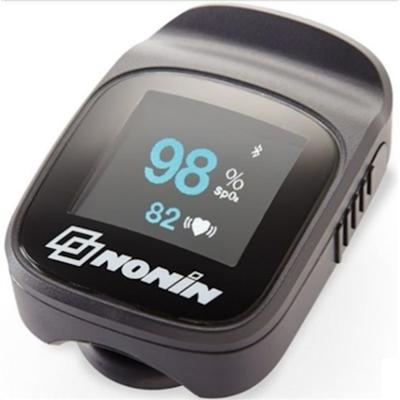
Nonin Medical NoninConnect™ Finger Pulse Oximeter with Bluetooth® Smart Wireless Technology""" NoninConnect™ Finger Pulse Oximeter with Bluetooth® Smart Wireless Technology for Clinicians and Patients — Nonin TruO2® OTC 3250 (OTC, No Prescription Required) The NoninConnect™ finger pulse oximeter is an over-the-counter (OTC) device , made..."299,00 $*Shipping: 0,00 $Secure redirect to the provider
-
On Spot Shop DC Wireless Remote Control Switch With Relay Output, RF Transmitter And Receiver For LED Lighting & Smart Device device With 1 RemoteReliable Control for Lighting & Automation Experience seamless control with the DC12V 8CH 8 Channel Wireless Remote Control LED Light Switch Relay Output Radio RF Transmitter and 315433 MHz Receiver. Designed for convenience, this system allows you...39,97 $*Shipping: 0,00 $Secure redirect to the provider
-
The Handy Homestead DIY Wooden Walkie Talkie Kit For Kids STEM Building Wireless Communication Toy DIY Wooden Walkie Talkie Kit For Kids STEM Building Wireless Communication ToySpark your childs I built this! moment with a handson project that turns curiosity into real play. This 2pcs DIY wooden walkie talkie kit lets kids assemble two working communication toys while exploring basic electronics, sound, and signal...54,97 $*Shipping: 0,00 $Secure redirect to the provider


-
Can you connect jusb1 to a USB 10 or 20 port of the NZXT Smart Device V2?
No, you cannot connect jusb1 to a USB 10 or 20 port of the NZXT Smart Device V2. The jusb1 is a USB 2.0 header connector, while the USB 10 and 20 ports on the NZXT Smart Device V2 are likely USB 3.0 or higher. The jusb1 connector is not compatible with the higher-speed USB ports on the Smart Device V2, so it should not be connected to those ports. **
-
Can you connect jusb1 to a USB 10 or 20 port on the NZXT Smart Device V2?
No, you cannot connect jusb1 to a USB 10 or 20 port on the NZXT Smart Device V2. The jusb1 connector is designed to be connected to a USB 2.0 header on the motherboard, not to a USB 3.0 or 3.1 port. Attempting to connect it to a USB 10 or 20 port could potentially damage the device or the port. It is important to always match the correct type of connector with the corresponding port to ensure proper functionality and prevent any damage. **
-
Can I use the DSL port with another device?
No, the DSL port is specifically designed to be used for connecting your DSL modem to the internet service provider's network. It is not intended to be used with any other device. Using the DSL port for another device could result in interference with your internet connection or damage to the equipment. If you need to connect multiple devices to your DSL modem, you can use a router with multiple Ethernet ports to distribute the internet connection to multiple devices. **
-
How does port forwarding work with T-Mobile?
Port forwarding with T-Mobile works by allowing you to open specific ports on your T-Mobile router to direct incoming traffic to a specific device on your network. This can be useful for hosting online games, setting up a home server, or accessing devices remotely. To set up port forwarding with T-Mobile, you would need to access your router's settings and configure the port forwarding rules to specify the incoming port and the local IP address of the device you want to forward the traffic to. Keep in mind that T-Mobile may have specific instructions or limitations for port forwarding, so it's important to consult their support resources for guidance. **


What is the port forwarding for port 25565?
Port forwarding for port 25565 is commonly used for setting up a Minecraft server. By forwarding this port, incoming traffic on port 25565 is directed to the Minecraft server, allowing players to connect to the server from outside the local network. This is necessary for hosting a multiplayer Minecraft game and allows players from different locations to join the same server. **
Is the USB port of the Lightning Digital AV Adapter defective?
It is difficult to determine if the USB port of the Lightning Digital AV Adapter is defective without more information. If you are experiencing issues with the USB port, it could be due to a faulty adapter, a problem with the device you are trying to connect, or an issue with the USB cable. It is recommended to try using the adapter with a different device and cable to see if the issue persists. If the problem continues, it may be best to contact the manufacturer for further assistance. **
Top-Angebote
Products related to Port:
-
LightInthebox 8USB Mobile Phone Fast Charging Digital Display QC3.0 Flash Charging Fast Multi-function PD Fast Charging Multi-port Charger With DisplayUSB Ports:8 Port; Type:Multi USB Charger Station; Function:Charging Station; Compatibility:Cellphone,Phone Tablets and More; Output Power:40; With Cable:Charger Only; Listing Date:04/26/2023; Material:ABS; Feature:for Multiple Devices,Security...43,99 $*Shipping: 8,90 $Secure redirect to the provider
-
Dell Da310 Usb-C Mobile Adapter 6 Port Multi Hub, NewOverview Turn a single USB-C connection into a complete mobile workstation with the Dell DA310 USB-C Mobile Adapter 7-in-1 Multiport Hub . Compact enough to carry with your laptop yet versatile enough for a full desk setup, the DA310 gives you access to HDMI, DisplayPort, VGA, USB-C, dual USB-A and Gigabit Ethernet from one convenient adapter. Whether you're connecting to a presentation display, transferring files from an external drive, plugging into wired networking or powering your laptop through USB-C, the DA310 helps reduce the number of individual adapters you need to carry. UPC / EAN: 884116383482 Key Features & Benefits Turn One USB-C Port into Seven Useful Connections – The DA310 combines display, network and USB connectivity in one compact adapter, helping keep your desk and travel bag free from multiple separate dongles. Connect to Modern 4K Displays Through HDMI – The HDMI 2.0 port supports resolutions up to 3840 × 2160 at 60Hz when used with a compatible system and display, giving presentations, video and productivity work sharp 4K detail. Use DisplayPort for High-Resolution Monitors – A dedicated DisplayPort 1.4 connection also supports up to 4K at 60Hz , giving you flexibility when connecting professional monitors and compatible displays. Stay Compatible with Older Displays and Projectors – The built-in VGA output supports up to 1920 × 1080 at 60Hz , making the DA310 particularly useful in offices, meeting rooms and classrooms where older projectors are still in service. Connect a Display Through USB-C – The multifunction USB-C port can output video at up to 3840 × 2160 at 30Hz , as well as provide USB data and compatible power-delivery functionality. Transfer Files at Up to 10Gbps – Two USB-A 3.2 Gen 2 ports and the downstream USB-C connection support data rates up to 10Gbps , helping compatible SSDs, flash drives and peripherals transfer data quickly. Get Reliable Wired Internet Without a Dedicated Laptop Ethernet Port – The integrated Gigabit Ethernet RJ45 port lets you connect directly to wired networks, ideal for office environments, large downloads and situations where Wi-Fi may be unreliable. Charge Your Laptop Through the Same Adapter – The DA310 supports up to 90W USB-C Power Delivery pass-through when connected to a suitable USB-C power source, allowing supported laptops to charge while the adapter remains connected. Reduce Cable Clutter at Your Desk – Video, networking, USB accessories and laptop power can all route through the same compact adapter, creating a much cleaner working setup. Ready for Presentations Wherever You Work – Having HDMI, DisplayPort and VGA available in one device makes the DA310 particularly useful for professionals who regularly connect to unfamiliar meeting-room displays. Connect Everyday Accessories Easily – Use the two USB-A ports for keyboards, mice, storage drives and other compatible peripherals without needing another USB hub. Designed for Mobile Working – The integrated USB-C cable wraps...75,00 £*Shipping: 0,00 £Secure redirect to the provider
-
Nonin Medical NoninConnect™ Finger Pulse Oximeter with Bluetooth® Smart Wireless Technology""" NoninConnect™ Finger Pulse Oximeter with Bluetooth® Smart Wireless Technology for Clinicians and Patients — Nonin TruO2® OTC 3250 (OTC, No Prescription Required) The NoninConnect™ finger pulse oximeter is an over-the-counter (OTC) device , made..."299,00 $*Shipping: 0,00 $Secure redirect to the provider
-
Which mobile device has a 35mm aux port for recording?
The mobile device that has a 35mm aux port for recording is the iPhone. The iPhone has a 3.5mm headphone jack that can be used for recording audio using an external microphone or other audio input device. This feature allows users to easily connect professional-grade microphones or other audio equipment to their iPhone for high-quality recording. **
-
Is the mobile phone charging port broken?
To determine if the mobile phone charging port is broken, you can try using a different charging cable and power adapter to see if the phone charges. If the phone still does not charge, the issue may be with the charging port. You can also inspect the charging port for any physical damage or debris that may be obstructing the connection. If you are unable to resolve the issue on your own, it may be best to consult a professional technician for further assistance. **
-
Can you connect jusb1 to a USB 10 or 20 port of the NZXT Smart Device V2?
No, you cannot connect jusb1 to a USB 10 or 20 port of the NZXT Smart Device V2. The jusb1 is a USB 2.0 header connector, while the USB 10 and 20 ports on the NZXT Smart Device V2 are likely USB 3.0 or higher. The jusb1 connector is not compatible with the higher-speed USB ports on the Smart Device V2, so it should not be connected to those ports. **
-
Can you connect jusb1 to a USB 10 or 20 port on the NZXT Smart Device V2?
No, you cannot connect jusb1 to a USB 10 or 20 port on the NZXT Smart Device V2. The jusb1 connector is designed to be connected to a USB 2.0 header on the motherboard, not to a USB 3.0 or 3.1 port. Attempting to connect it to a USB 10 or 20 port could potentially damage the device or the port. It is important to always match the correct type of connector with the corresponding port to ensure proper functionality and prevent any damage. **
Similar search terms for Port
-
On Spot Shop DC Wireless Remote Control Switch With Relay Output, RF Transmitter And Receiver For LED Lighting & Smart Device device With 1 RemoteReliable Control for Lighting & Automation Experience seamless control with the DC12V 8CH 8 Channel Wireless Remote Control LED Light Switch Relay Output Radio RF Transmitter and 315433 MHz Receiver. Designed for convenience, this system allows you...39,97 $*Shipping: 0,00 $Secure redirect to the provider
-
The Handy Homestead DIY Wooden Walkie Talkie Kit For Kids STEM Building Wireless Communication Toy DIY Wooden Walkie Talkie Kit For Kids STEM Building Wireless Communication ToySpark your childs I built this! moment with a handson project that turns curiosity into real play. This 2pcs DIY wooden walkie talkie kit lets kids assemble two working communication toys while exploring basic electronics, sound, and signal...54,97 $*Shipping: 0,00 $Secure redirect to the provider
-
LightInthebox 8USB Mobile Phone Fast Charging Digital Display QC3.0 Flash Charging Fast Multi-function PD Fast Charging Multi-port Charger With DisplayUSB Ports:8 Port; Type:Multi USB Charger Station; Function:Charging Station; Compatibility:Cellphone,Phone Tablets and More; Output Power:40; With Cable:Charger Only; Listing Date:04/26/2023; Material:ABS; Feature:for Multiple Devices,Security...43,99 $*Shipping: 8,22 $Secure redirect to the provider
-
LightInthebox 8USB Mobile Phone Fast Charging Digital Display QC3.0 Flash Charging Fast Multi-function PD Fast Charging Multi-port Charger With DisplayUSB Ports:8 Port; Type:Multi USB Charger Station; Function:Charging Station; Compatibility:Cellphone,Phone Tablets and More; Output Power:40; With Cable:Charger Only; Listing Date:04/26/2023; Material:ABS; Feature:for Multiple Devices,Security...43,99 $*Shipping: 8,45 $Secure redirect to the provider
-
Can I use the DSL port with another device?
No, the DSL port is specifically designed to be used for connecting your DSL modem to the internet service provider's network. It is not intended to be used with any other device. Using the DSL port for another device could result in interference with your internet connection or damage to the equipment. If you need to connect multiple devices to your DSL modem, you can use a router with multiple Ethernet ports to distribute the internet connection to multiple devices. **
-
How does port forwarding work with T-Mobile?
Port forwarding with T-Mobile works by allowing you to open specific ports on your T-Mobile router to direct incoming traffic to a specific device on your network. This can be useful for hosting online games, setting up a home server, or accessing devices remotely. To set up port forwarding with T-Mobile, you would need to access your router's settings and configure the port forwarding rules to specify the incoming port and the local IP address of the device you want to forward the traffic to. Keep in mind that T-Mobile may have specific instructions or limitations for port forwarding, so it's important to consult their support resources for guidance. **
-
What is the port forwarding for port 25565?
Port forwarding for port 25565 is commonly used for setting up a Minecraft server. By forwarding this port, incoming traffic on port 25565 is directed to the Minecraft server, allowing players to connect to the server from outside the local network. This is necessary for hosting a multiplayer Minecraft game and allows players from different locations to join the same server. **
-
Is the USB port of the Lightning Digital AV Adapter defective?
It is difficult to determine if the USB port of the Lightning Digital AV Adapter is defective without more information. If you are experiencing issues with the USB port, it could be due to a faulty adapter, a problem with the device you are trying to connect, or an issue with the USB cable. It is recommended to try using the adapter with a different device and cable to see if the issue persists. If the problem continues, it may be best to contact the manufacturer for further assistance. **
* All prices are inclusive of VAT and, if applicable, plus shipping costs. The offer information is based on the details provided by the respective shop and is updated through automated processes. Real-time updates do not occur, so deviations can occur in individual cases. ** Note: Parts of this content were created by AI.