Buy allphone.eu ?
We are moving the project
allphone.eu .
Are you interested in purchasing the domain
allphone.eu ?
domain@kv-gmbh.de · 0541-91531010
Buy allphone.eu ?
What is a spreadsheet?
A spreadsheet is a computer program used to organize and analyze data in a tabular format. It consists of rows and columns, with each intersection of a row and column referred to as a cell. Spreadsheets are commonly used for tasks such as budgeting, financial analysis, data manipulation, and creating charts and graphs. They allow users to perform calculations, create formulas, and visualize data in a structured and organized manner. Popular spreadsheet programs include Microsoft Excel, Google Sheets, and Apple Numbers. **
How has the Excel spreadsheet changed?
The Excel spreadsheet has changed significantly over the years with the addition of new features and capabilities. It has evolved from a simple tool for basic data entry and calculations to a powerful platform for data analysis, visualization, and collaboration. The introduction of functions, pivot tables, and advanced charting options has made it easier to manipulate and analyze large datasets. Additionally, the integration of cloud-based services and the ability to work on Excel spreadsheets across different devices has made it more accessible and versatile for users. Overall, the Excel spreadsheet has transformed into a comprehensive tool for managing and analyzing data in various industries and professions. **


Similar search terms for Spreadsheet
Top-Angebote
Products related to Spreadsheet:
-
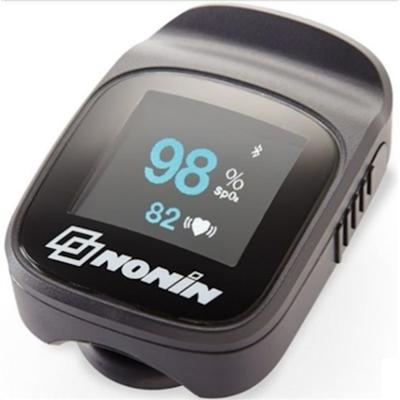
Nonin Medical NoninConnect™ Finger Pulse Oximeter with Bluetooth® Smart Wireless Technology""" NoninConnect™ Finger Pulse Oximeter with Bluetooth® Smart Wireless Technology for Clinicians and Patients — Nonin TruO2® OTC 3250 (OTC, No Prescription Required) The NoninConnect™ finger pulse oximeter is an over-the-counter (OTC) device , made..."299,00 $*Shipping: 0,00 $Secure redirect to the provider
-
Steelplay MetalTech Radian Wireless Gaming Headset - Wireless and Wired Connectivity, Detachable Microphone, Volume ControlsThe Steelplay MetalTech Radian wireless gaming headset offers flexible audio for gaming and everyday entertainment. It's designed for use across consoles, computers, and compatible mobile devices. You can connect wirelessly through the supplied low-latency USB-C dongle or use the detachable 3.5 mm braided cable for a wired connection. The headset features a comfortable, adaptable design with soft ear cushions and an adjustable padded headband for a secure fit during longer gaming, music, and film sessions. The detachable boom microphone supports in-game chat and can be removed when not required. Key features include wireless and wired connectivity, a supplied USB-C dongle for compatible devices, a detachable microphone for flexible voice chat, integrated volume and microphone controls, and a detachable 2 m braided 3.5 mm audio cable. The headset also includes a 1.5 m braided USB-C charging cable and is compatible with PS5, PS4, Nintendo Switch, PC, Mac, and compatible Android or iOS devices using the supplied dongle.26,99 £*Shipping: 3,95 £Secure redirect to the provider
-
On Spot Shop DC Wireless Remote Control Switch With Relay Output, RF Transmitter And Receiver For LED Lighting & Smart Device device With 1 RemoteReliable Control for Lighting & Automation Experience seamless control with the DC12V 8CH 8 Channel Wireless Remote Control LED Light Switch Relay Output Radio RF Transmitter and 315433 MHz Receiver. Designed for convenience, this system allows you...39,97 $*Shipping: 0,00 $Secure redirect to the provider



-
Can I sell my Excel spreadsheet?
Yes, you can sell your Excel spreadsheet as long as you have the legal rights to do so. If the spreadsheet contains original work created by you, then you have the right to sell it. However, if the spreadsheet contains copyrighted material or data that you do not have the rights to, then you may not be able to sell it without obtaining the necessary permissions. It's important to ensure that you are not infringing on any copyrights or intellectual property rights when selling your Excel spreadsheet. **
-
How can one summarize a spreadsheet?
One can summarize a spreadsheet by using functions such as SUM, AVERAGE, MIN, MAX, and COUNT to calculate totals, averages, and other statistical measures for a range of data. Additionally, one can use pivot tables to group and summarize data in a more organized and visually appealing manner. Summarizing a spreadsheet allows for quick analysis and understanding of the data without having to manually calculate and organize the information. **
-
How can I sell an Excel spreadsheet?
To sell an Excel spreadsheet, you can consider creating a detailed and valuable template or tool that solves a specific problem or fulfills a need for a target audience. You can then market your spreadsheet on online platforms such as Etsy, Gumroad, or your own website. Additionally, you can promote your spreadsheet through social media, email marketing, or collaborations with influencers in your niche to reach a wider audience and drive sales. Lastly, ensure that you provide clear instructions, customer support, and updates to maintain customer satisfaction and encourage repeat purchases. **
-
Does anyone know an Excel spreadsheet calculator?
Yes, there are many Excel spreadsheet calculators available online that can help with various calculations such as budgeting, loan payments, and financial planning. You can easily find these calculators by searching for specific terms like "Excel budget calculator" or "Excel loan calculator" on search engines or by visiting websites that offer free Excel templates and calculators. Additionally, Microsoft Excel itself has built-in functions and tools that can be used to create custom calculators for specific needs. **


How can one automatically name a spreadsheet?
One way to automatically name a spreadsheet is to use a naming convention based on the content or purpose of the spreadsheet. For example, you could use a combination of the date, project name, or department to create a consistent naming structure. Another option is to use a macro or script to automatically generate a name based on certain criteria, such as the data in the spreadsheet or the user who created it. This can help ensure that spreadsheets are consistently and accurately named, making it easier to organize and find them later. **
How can I move an Excel spreadsheet?
You can move an Excel spreadsheet by simply clicking and dragging the file to the desired location on your computer. Alternatively, you can right-click on the file, select "Cut," navigate to the new location, and then right-click and select "Paste" to move the file. If you are using a cloud storage service, such as Google Drive or Dropbox, you can also move the spreadsheet by dragging and dropping it into the desired folder within the cloud storage platform. **
Top-Angebote
Products related to Spreadsheet:
-
Nonin Medical NoninConnect™ Finger Pulse Oximeter with Bluetooth® Smart Wireless Technology""" NoninConnect™ Finger Pulse Oximeter with Bluetooth® Smart Wireless Technology for Clinicians and Patients — Nonin TruO2® OTC 3250 (OTC, No Prescription Required) The NoninConnect™ finger pulse oximeter is an over-the-counter (OTC) device , made..."299,00 $*Shipping: 0,00 $Secure redirect to the provider
-
What is a spreadsheet?
A spreadsheet is a computer program used to organize and analyze data in a tabular format. It consists of rows and columns, with each intersection of a row and column referred to as a cell. Spreadsheets are commonly used for tasks such as budgeting, financial analysis, data manipulation, and creating charts and graphs. They allow users to perform calculations, create formulas, and visualize data in a structured and organized manner. Popular spreadsheet programs include Microsoft Excel, Google Sheets, and Apple Numbers. **
-
How has the Excel spreadsheet changed?
The Excel spreadsheet has changed significantly over the years with the addition of new features and capabilities. It has evolved from a simple tool for basic data entry and calculations to a powerful platform for data analysis, visualization, and collaboration. The introduction of functions, pivot tables, and advanced charting options has made it easier to manipulate and analyze large datasets. Additionally, the integration of cloud-based services and the ability to work on Excel spreadsheets across different devices has made it more accessible and versatile for users. Overall, the Excel spreadsheet has transformed into a comprehensive tool for managing and analyzing data in various industries and professions. **
-
Can I sell my Excel spreadsheet?
Yes, you can sell your Excel spreadsheet as long as you have the legal rights to do so. If the spreadsheet contains original work created by you, then you have the right to sell it. However, if the spreadsheet contains copyrighted material or data that you do not have the rights to, then you may not be able to sell it without obtaining the necessary permissions. It's important to ensure that you are not infringing on any copyrights or intellectual property rights when selling your Excel spreadsheet. **
-
How can one summarize a spreadsheet?
One can summarize a spreadsheet by using functions such as SUM, AVERAGE, MIN, MAX, and COUNT to calculate totals, averages, and other statistical measures for a range of data. Additionally, one can use pivot tables to group and summarize data in a more organized and visually appealing manner. Summarizing a spreadsheet allows for quick analysis and understanding of the data without having to manually calculate and organize the information. **
Similar search terms for Spreadsheet
-
Steelplay MetalTech Radian Wireless Gaming Headset - Wireless and Wired Connectivity, Detachable Microphone, Volume ControlsThe Steelplay MetalTech Radian wireless gaming headset offers flexible audio for gaming and everyday entertainment. It's designed for use across consoles, computers, and compatible mobile devices. You can connect wirelessly through the supplied low-latency USB-C dongle or use the detachable 3.5 mm braided cable for a wired connection. The headset features a comfortable, adaptable design with soft ear cushions and an adjustable padded headband for a secure fit during longer gaming, music, and film sessions. The detachable boom microphone supports in-game chat and can be removed when not required. Key features include wireless and wired connectivity, a supplied USB-C dongle for compatible devices, a detachable microphone for flexible voice chat, integrated volume and microphone controls, and a detachable 2 m braided 3.5 mm audio cable. The headset also includes a 1.5 m braided USB-C charging cable and is compatible with PS5, PS4, Nintendo Switch, PC, Mac, and compatible Android or iOS devices using the supplied dongle.26,99 £*Shipping: 3,95 £Secure redirect to the provider
-
On Spot Shop DC Wireless Remote Control Switch With Relay Output, RF Transmitter And Receiver For LED Lighting & Smart Device device With 1 RemoteReliable Control for Lighting & Automation Experience seamless control with the DC12V 8CH 8 Channel Wireless Remote Control LED Light Switch Relay Output Radio RF Transmitter and 315433 MHz Receiver. Designed for convenience, this system allows you...39,97 $*Shipping: 0,00 $Secure redirect to the provider
-
NextBase IQ 4K Smart Dash Cam – Latest December Update, Inbuilt Cabin Car Cam, 4G ConnectivityOverview: The Nextbase IQ 4K Smart Dash Cam combines ultra-high-definition recording with advanced safety and convenience features. With the latest December update, it offers enhanced live view capabilities, smart parking mode, witness mode, SOS response, and voice control. Equipped with inbuilt cabin camera and 4G connectivity, this dash cam ensures comprehensive vehicle and passenger monitoring, delivering peace of mind on every journey. Product Description: Capture every detail on the road with the Nextbase IQ 4K Smart Dash Cam. The 4K ultra HD recording provides crystal-clear video footage of your surroundings, while the inbuilt cabin camera monitors the interior of your vehicle. Stay connected with 4G for live viewing, instant notifications, and SOS emergency response. Smart parking mode protects your vehicle while parked, and witness mode offers crucial video evidence in the event of an incident. Voice control allows hands-free operation, making it safer and easier to use. The latest software update further improves performance and user experience. Key Features: Ultra-high-definition 4K recording for clear, detailed footage Inbuilt cabin camera for interior monitoring 4G connectivity for live view and instant notifications Smart parking mode to monitor your vehicle while parked Witness mode for capturing crucial incident evidence SOS response feature for emergency assistance Voice control for hands-free operation Latest December software update with enhanced features399,00 £*Shipping: 0,00 £Secure redirect to the provider
-
The Handy Homestead DIY Wooden Walkie Talkie Kit For Kids STEM Building Wireless Communication Toy DIY Wooden Walkie Talkie Kit For Kids STEM Building Wireless Communication ToySpark your childs I built this! moment with a handson project that turns curiosity into real play. This 2pcs DIY wooden walkie talkie kit lets kids assemble two working communication toys while exploring basic electronics, sound, and signal...54,97 $*Shipping: 0,00 $Secure redirect to the provider
-
How can I sell an Excel spreadsheet?
To sell an Excel spreadsheet, you can consider creating a detailed and valuable template or tool that solves a specific problem or fulfills a need for a target audience. You can then market your spreadsheet on online platforms such as Etsy, Gumroad, or your own website. Additionally, you can promote your spreadsheet through social media, email marketing, or collaborations with influencers in your niche to reach a wider audience and drive sales. Lastly, ensure that you provide clear instructions, customer support, and updates to maintain customer satisfaction and encourage repeat purchases. **
-
Does anyone know an Excel spreadsheet calculator?
Yes, there are many Excel spreadsheet calculators available online that can help with various calculations such as budgeting, loan payments, and financial planning. You can easily find these calculators by searching for specific terms like "Excel budget calculator" or "Excel loan calculator" on search engines or by visiting websites that offer free Excel templates and calculators. Additionally, Microsoft Excel itself has built-in functions and tools that can be used to create custom calculators for specific needs. **
-
How can one automatically name a spreadsheet?
One way to automatically name a spreadsheet is to use a naming convention based on the content or purpose of the spreadsheet. For example, you could use a combination of the date, project name, or department to create a consistent naming structure. Another option is to use a macro or script to automatically generate a name based on certain criteria, such as the data in the spreadsheet or the user who created it. This can help ensure that spreadsheets are consistently and accurately named, making it easier to organize and find them later. **
-
How can I move an Excel spreadsheet?
You can move an Excel spreadsheet by simply clicking and dragging the file to the desired location on your computer. Alternatively, you can right-click on the file, select "Cut," navigate to the new location, and then right-click and select "Paste" to move the file. If you are using a cloud storage service, such as Google Drive or Dropbox, you can also move the spreadsheet by dragging and dropping it into the desired folder within the cloud storage platform. **
* All prices are inclusive of VAT and, if applicable, plus shipping costs. The offer information is based on the details provided by the respective shop and is updated through automated processes. Real-time updates do not occur, so deviations can occur in individual cases. ** Note: Parts of this content were created by AI.