Buy allphone.eu ?
We are moving the project
allphone.eu .
Are you interested in purchasing the domain
allphone.eu ?
domain@kv-gmbh.de · 0541-91531010
Buy allphone.eu ?
What is a viewfinder?
A viewfinder is a small window or electronic display on a camera that allows the photographer to see the scene they are about to capture. It helps the photographer to frame the shot and ensure that the composition is correct. There are different types of viewfinders, including optical viewfinders and electronic viewfinders, each with its own advantages and limitations. Overall, the viewfinder is an essential tool for photographers to accurately compose and capture their images. **
How do I find the manga Viewfinder?
You can find the manga Viewfinder by searching for it in online manga stores or websites that specialize in manga and anime. You can also check with local bookstores or comic shops to see if they have it in stock. Additionally, you can look for Viewfinder in libraries that carry manga and graphic novels. If all else fails, you can consider purchasing it from online marketplaces or auction sites. **

Similar search terms for Viewfinder
Top-Angebote
Products related to Viewfinder:
-
SWISSTEN 22071510 Charger Device, mobile communicationPlug Type: Schuko; Connectors/Plugs: USB type-C, USB; Charge Mode: GaN, PD; Overcharging protection: Yes; Overheating protection: Yes; Short Circuit Protection: Yes; Colour: black; Number of inlets/outlets: 2; Power [W]: 126,59 £*Shipping: 8,45 £Secure redirect to the provider




-
How can I find the manga Viewfinder?
You can find the manga Viewfinder by searching for it on online manga platforms such as MangaDex, Manga Rock, or MangaFox. You can also check out online bookstores like Amazon or Book Depository to purchase physical copies of the manga. Additionally, you may find Viewfinder at your local bookstore or comic shop, or you can try searching for it at your nearest library. **
-
Is a spot on the camera viewfinder normal?
A spot on the camera viewfinder is not normal and could indicate a problem with the camera. It could be caused by dust or dirt on the viewfinder, a scratch on the viewfinder lens, or a malfunction in the camera's internal components. It is recommended to clean the viewfinder carefully to see if the spot disappears, and if not, it may be necessary to have the camera inspected by a professional. **
-
How can one precisely adjust the telescope's viewfinder?
To precisely adjust the telescope's viewfinder, start by focusing the main telescope on a distant object. Then, use the adjustment screws on the viewfinder to align its crosshairs with the same object. This will ensure that the viewfinder is accurately pointing at the same spot as the main telescope. Once the viewfinder is aligned, the telescope's viewfinder will be precisely adjusted and ready for use. **
-
Why are the photos black through the viewfinder?
The photos are black through the viewfinder because the camera's lens cap may still be on, or the camera may be in a mode where the lens is not open, such as in the case of a point-and-shoot camera with a lens cover. Additionally, the camera's settings may be incorrect, causing the photos to appear black through the viewfinder. It is important to check the camera's settings and ensure that the lens cap is removed in order to capture clear and visible photos. **


Why is the viewfinder of the Canon blurry?
The viewfinder of the Canon may be blurry due to a few reasons. One common reason is that the diopter adjustment may not be properly set for the user's eyesight, causing the viewfinder to appear blurry. Another reason could be that the viewfinder itself is dirty or smudged, which can affect the clarity of the image. Additionally, if the camera's lens is not properly focused, it can also result in a blurry viewfinder image. Regular cleaning and proper adjustment of the diopter can help improve the clarity of the viewfinder. **
What is the name of the viewfinder on a camera?
The viewfinder on a camera is simply called the "viewfinder." It is the part of the camera that allows the photographer to see the scene they are about to capture through the lens. Some cameras have optical viewfinders, while others have electronic viewfinders (EVF) that display a digital image of the scene. **
Top-Angebote
Products related to Viewfinder:
-
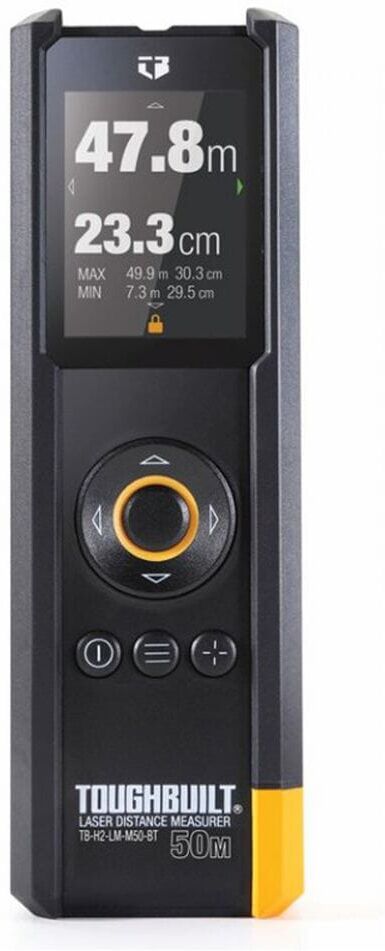
TOUGHBUILT 50M Laser Distance Measurer with Digital ViewfinderTOUGHBUILT 50M Laser Distance Measurer with Digital Viewfinder (TB-H2-LM-M50-BT) A laser dot that vanishes in bright daylight or at long range makes a laser measurer hard to use outdoors. The ToughBuilt 50m Laser Distance Measurer solves that with a digital viewfinder and adjustable zoom (up to 4x), so you can see exactly where the red laser point lands on a distant target, indoors or out. It measures up to 50m (165ft), and the large colour screen shows the reading clearly. A built-in inclinometer allows calculated measurements and functions beyond a simple distance reading. Bluetooth connects the measurer to the ToughBuilt Connect app on iOS and Android, so measurements can be stored, annotated with photos and notes, and shared as reports instead of being copied down by hand. Key Features & Benefits138,00 £*Shipping: 0,00 £Secure redirect to the provider
-
What is a viewfinder?
A viewfinder is a small window or electronic display on a camera that allows the photographer to see the scene they are about to capture. It helps the photographer to frame the shot and ensure that the composition is correct. There are different types of viewfinders, including optical viewfinders and electronic viewfinders, each with its own advantages and limitations. Overall, the viewfinder is an essential tool for photographers to accurately compose and capture their images. **
-
How do I find the manga Viewfinder?
You can find the manga Viewfinder by searching for it in online manga stores or websites that specialize in manga and anime. You can also check with local bookstores or comic shops to see if they have it in stock. Additionally, you can look for Viewfinder in libraries that carry manga and graphic novels. If all else fails, you can consider purchasing it from online marketplaces or auction sites. **
-
How can I find the manga Viewfinder?
You can find the manga Viewfinder by searching for it on online manga platforms such as MangaDex, Manga Rock, or MangaFox. You can also check out online bookstores like Amazon or Book Depository to purchase physical copies of the manga. Additionally, you may find Viewfinder at your local bookstore or comic shop, or you can try searching for it at your nearest library. **
-
Is a spot on the camera viewfinder normal?
A spot on the camera viewfinder is not normal and could indicate a problem with the camera. It could be caused by dust or dirt on the viewfinder, a scratch on the viewfinder lens, or a malfunction in the camera's internal components. It is recommended to clean the viewfinder carefully to see if the spot disappears, and if not, it may be necessary to have the camera inspected by a professional. **
Similar search terms for Viewfinder
-
SWISSTEN 22071510 Charger Device, mobile communicationPlug Type: Schuko; Connectors/Plugs: USB type-C, USB; Charge Mode: GaN, PD; Overcharging protection: Yes; Overheating protection: Yes; Short Circuit Protection: Yes; Colour: black; Number of inlets/outlets: 2; Power [W]: 126,59 £*Shipping: 8,45 £Secure redirect to the provider
-
HyperX Pulsefire Fuse Wireless Gaming Mouse – Lightweight RGB Gaming Mouse with Dual Wireless ConnectivityOverview The HyperX Pulsefire Fuse Wireless Gaming Mouse is designed for gamers who want precision, comfort, and wireless freedom. Featuring a lightweight frame and microline grip textured panels, this gaming mouse provides excellent control during fast-paced gameplay. With customisable DPI presets, dual wireless connectivity, and RGB lighting control through HyperX NGENUITY software, the Pulsefire Fuse delivers responsive performance and personalised gaming settings. Its ergonomic design ensures comfortable use for extended gaming sessions while maintaining reliable wireless performance. Key Features Dual Wireless Connectivity – Connect via low-latency 2.4GHz wireless or Bluetooth for flexible gaming setups. Lightweight Gaming Design – Built for fast movement and improved control during gameplay. Microline Grip Textured Panels – Enhanced grip for better accuracy and stability. Customisable DPI Presets – Adjust sensitivity settings to suit different gaming styles. RGB Lighting Effects – Personalise lighting with custom RGB settings. HyperX NGENUITY Software Support – Configure DPI levels, button functions, and RGB lighting. High-Precision Gaming Sensor – Accurate tracking for competitive gameplay. Long Battery Life – Designed to support extended gaming sessions. Ergonomic Shape – Comfortable grip suitable for long hours of use. Benefits The HyperX Pulsefire Fuse Wireless Gaming Mouse provides gamers with responsive control and flexibility thanks to its dual wireless connectivity options. The lightweight build allows for quick movements and improved accuracy, while the textured grip panels ensure the mouse remains stable during intense gaming moments. Customisable DPI presets allow players to adjust sensitivity for different game genres, whether precision aiming in FPS games or fast movement in strategy and action titles. With RGB lighting customisation and HyperX NGENUITY software integration, users can personalise their setup to match their gaming style. Designed for comfort and reliability, the Pulsefire Fuse is an excellent choice for gamers who want wireless performance without compromising control. Specifications Specification Details Brand HyperX Model Pulsefire Fuse Wireless EAN / Barcode [Ean] Type Wireless Gaming Mouse Connectivity 2.4GHz Wireless / Bluetooth Sensor Type High Precision Gaming Sensor DPI Settings Customisable DPI Presets Lighting RGB Customisable Lighting Software HyperX NGENUITY Grip Microline Grip Textured Panels Design Lightweight Gaming Frame Buttons Programmable Buttons Battery Rechargeable / Long Battery Life Compatibility Windows PC34,00 £*Shipping: 0,00 £Secure redirect to the provider
-
Steelplay MetalTech Radian Wireless Gaming Headset - Wireless and Wired Connectivity, Detachable Microphone, Volume ControlsThe Steelplay MetalTech Radian wireless gaming headset offers flexible audio for gaming and everyday entertainment. It's designed for use across consoles, computers, and compatible mobile devices. You can connect wirelessly through the supplied low-latency USB-C dongle or use the detachable 3.5 mm braided cable for a wired connection. The headset features a comfortable, adaptable design with soft ear cushions and an adjustable padded headband for a secure fit during longer gaming, music, and film sessions. The detachable boom microphone supports in-game chat and can be removed when not required. Key features include wireless and wired connectivity, a supplied USB-C dongle for compatible devices, a detachable microphone for flexible voice chat, integrated volume and microphone controls, and a detachable 2 m braided 3.5 mm audio cable. The headset also includes a 1.5 m braided USB-C charging cable and is compatible with PS5, PS4, Nintendo Switch, PC, Mac, and compatible Android or iOS devices using the supplied dongle.26,99 £*Shipping: 3,95 £Secure redirect to the provider
-
How can one precisely adjust the telescope's viewfinder?
To precisely adjust the telescope's viewfinder, start by focusing the main telescope on a distant object. Then, use the adjustment screws on the viewfinder to align its crosshairs with the same object. This will ensure that the viewfinder is accurately pointing at the same spot as the main telescope. Once the viewfinder is aligned, the telescope's viewfinder will be precisely adjusted and ready for use. **
-
Why are the photos black through the viewfinder?
The photos are black through the viewfinder because the camera's lens cap may still be on, or the camera may be in a mode where the lens is not open, such as in the case of a point-and-shoot camera with a lens cover. Additionally, the camera's settings may be incorrect, causing the photos to appear black through the viewfinder. It is important to check the camera's settings and ensure that the lens cap is removed in order to capture clear and visible photos. **
-
Why is the viewfinder of the Canon blurry?
The viewfinder of the Canon may be blurry due to a few reasons. One common reason is that the diopter adjustment may not be properly set for the user's eyesight, causing the viewfinder to appear blurry. Another reason could be that the viewfinder itself is dirty or smudged, which can affect the clarity of the image. Additionally, if the camera's lens is not properly focused, it can also result in a blurry viewfinder image. Regular cleaning and proper adjustment of the diopter can help improve the clarity of the viewfinder. **
-
What is the name of the viewfinder on a camera?
The viewfinder on a camera is simply called the "viewfinder." It is the part of the camera that allows the photographer to see the scene they are about to capture through the lens. Some cameras have optical viewfinders, while others have electronic viewfinders (EVF) that display a digital image of the scene. **
* All prices are inclusive of VAT and, if applicable, plus shipping costs. The offer information is based on the details provided by the respective shop and is updated through automated processes. Real-time updates do not occur, so deviations can occur in individual cases. ** Note: Parts of this content were created by AI.