Buy allphone.eu ?
We are moving the project
allphone.eu .
Are you interested in purchasing the domain
allphone.eu ?
domain@kv-gmbh.de · 0541-91531010
Buy allphone.eu ?
How does lighting technology respond to music?
Lighting technology can respond to music through a process called sound-to-light synchronization. This technology allows lights to change color, intensity, and patterns in response to the rhythm, tempo, and volume of the music being played. By using sensors or software that analyze the audio input, lighting systems can create dynamic and immersive visual experiences that enhance the overall atmosphere of a performance or event. This synchronization adds another layer of sensory stimulation for the audience, creating a more engaging and memorable experience. **
Does the device or resource DNS server not respond?
If the device or resource DNS server does not respond, it means that the Domain Name System (DNS) server is not able to process the request for translating domain names into IP addresses. This can happen due to various reasons such as network connectivity issues, misconfiguration of DNS settings, or problems with the DNS server itself. To troubleshoot this issue, you can try restarting the DNS server, checking the network connection, or contacting your network administrator for assistance. **


Similar search terms for Respond
Top-Angebote
Products related to Respond:
-
SWISSTEN 22071510 Charger Device, mobile communicationPlug Type: Schuko; Connectors/Plugs: USB type-C, USB; Charge Mode: GaN, PD; Overcharging protection: Yes; Overheating protection: Yes; Short Circuit Protection: Yes; Colour: black; Number of inlets/outlets: 2; Power [W]: 126,59 £*Shipping: 8,45 £Secure redirect to the provider
-
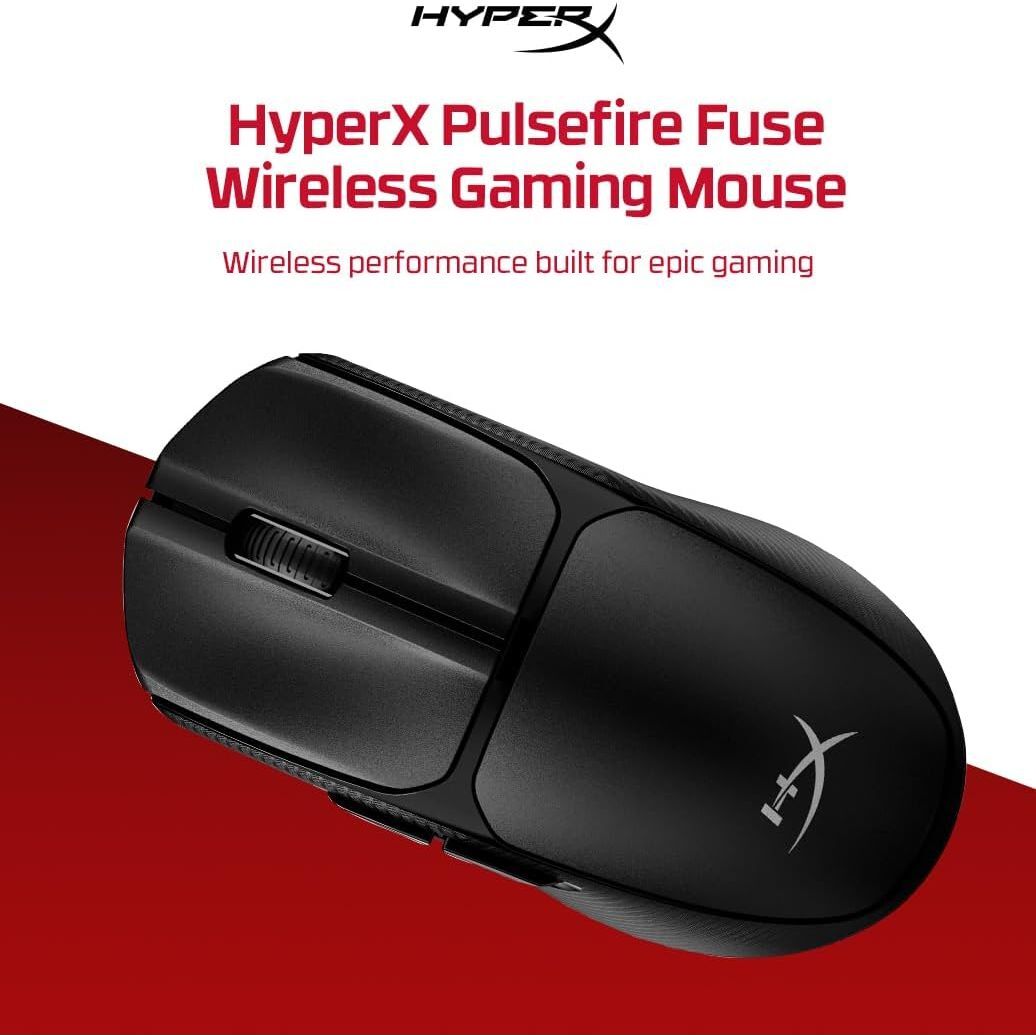
HyperX Pulsefire Fuse Wireless Gaming Mouse – Lightweight RGB Gaming Mouse with Dual Wireless ConnectivityOverview The HyperX Pulsefire Fuse Wireless Gaming Mouse is designed for gamers who want precision, comfort, and wireless freedom. Featuring a lightweight frame and microline grip textured panels, this gaming mouse provides excellent control during fast-paced gameplay. With customisable DPI presets, dual wireless connectivity, and RGB lighting control through HyperX NGENUITY software, the Pulsefire Fuse delivers responsive performance and personalised gaming settings. Its ergonomic design ensures comfortable use for extended gaming sessions while maintaining reliable wireless performance. Key Features Dual Wireless Connectivity – Connect via low-latency 2.4GHz wireless or Bluetooth for flexible gaming setups. Lightweight Gaming Design – Built for fast movement and improved control during gameplay. Microline Grip Textured Panels – Enhanced grip for better accuracy and stability. Customisable DPI Presets – Adjust sensitivity settings to suit different gaming styles. RGB Lighting Effects – Personalise lighting with custom RGB settings. HyperX NGENUITY Software Support – Configure DPI levels, button functions, and RGB lighting. High-Precision Gaming Sensor – Accurate tracking for competitive gameplay. Long Battery Life – Designed to support extended gaming sessions. Ergonomic Shape – Comfortable grip suitable for long hours of use. Benefits The HyperX Pulsefire Fuse Wireless Gaming Mouse provides gamers with responsive control and flexibility thanks to its dual wireless connectivity options. The lightweight build allows for quick movements and improved accuracy, while the textured grip panels ensure the mouse remains stable during intense gaming moments. Customisable DPI presets allow players to adjust sensitivity for different game genres, whether precision aiming in FPS games or fast movement in strategy and action titles. With RGB lighting customisation and HyperX NGENUITY software integration, users can personalise their setup to match their gaming style. Designed for comfort and reliability, the Pulsefire Fuse is an excellent choice for gamers who want wireless performance without compromising control. Specifications Specification Details Brand HyperX Model Pulsefire Fuse Wireless EAN / Barcode [Ean] Type Wireless Gaming Mouse Connectivity 2.4GHz Wireless / Bluetooth Sensor Type High Precision Gaming Sensor DPI Settings Customisable DPI Presets Lighting RGB Customisable Lighting Software HyperX NGENUITY Grip Microline Grip Textured Panels Design Lightweight Gaming Frame Buttons Programmable Buttons Battery Rechargeable / Long Battery Life Compatibility Windows PC34,00 £*Shipping: 0,00 £Secure redirect to the provider



-
What is digital communication?
Digital communication refers to the exchange of information through electronic devices such as computers, smartphones, and tablets. It involves sending and receiving data in the form of text, images, videos, or audio over digital channels like email, social media, messaging apps, and websites. Digital communication allows for instant and efficient communication between individuals or groups regardless of geographical location, making it a vital aspect of modern-day interactions and business operations. **
-
Please respond.
I'm here to help! What question would you like me to respond to? **
-
How do I activate wireless connectivity in Windows 7?
To activate wireless connectivity in Windows 7, you can follow these steps: 1. Click on the Start button and then select Control Panel. 2. In the Control Panel, click on Network and Sharing Center. 3. In the Network and Sharing Center, click on the "Change adapter settings" option on the left-hand side. 4. Right-click on the wireless network connection and select "Enable" from the drop-down menu. Once you have completed these steps, your wireless connectivity should be activated and you should be able to connect to available wireless networks. **
-
To which incorrect commands does the universal remote control device respond?
The universal remote control device responds to incorrect commands such as pressing the wrong button, entering the wrong code, or using a command that is not compatible with the device being controlled. It may also respond to commands that are not recognized or programmed into its system. In general, the universal remote control will not respond to commands that are not within its programmed capabilities. **

What can be done if the Samsung Smart TV does not respond?
If a Samsung Smart TV is not responding, there are a few troubleshooting steps that can be taken. First, try turning the TV off and on again to see if that resolves the issue. If that doesn't work, check the batteries in the remote control and replace them if necessary. Additionally, make sure the TV is properly connected to the power source and that all cables are securely plugged in. If the issue persists, it may be helpful to reset the TV to its factory settings or contact Samsung customer support for further assistance. **
Please respond quickly.
Of course! I am here to assist you promptly. Please let me know how I can help you. **
Top-Angebote
Products related to Respond:
-
How does lighting technology respond to music?
Lighting technology can respond to music through a process called sound-to-light synchronization. This technology allows lights to change color, intensity, and patterns in response to the rhythm, tempo, and volume of the music being played. By using sensors or software that analyze the audio input, lighting systems can create dynamic and immersive visual experiences that enhance the overall atmosphere of a performance or event. This synchronization adds another layer of sensory stimulation for the audience, creating a more engaging and memorable experience. **
-
Does the device or resource DNS server not respond?
If the device or resource DNS server does not respond, it means that the Domain Name System (DNS) server is not able to process the request for translating domain names into IP addresses. This can happen due to various reasons such as network connectivity issues, misconfiguration of DNS settings, or problems with the DNS server itself. To troubleshoot this issue, you can try restarting the DNS server, checking the network connection, or contacting your network administrator for assistance. **
-
What is digital communication?
Digital communication refers to the exchange of information through electronic devices such as computers, smartphones, and tablets. It involves sending and receiving data in the form of text, images, videos, or audio over digital channels like email, social media, messaging apps, and websites. Digital communication allows for instant and efficient communication between individuals or groups regardless of geographical location, making it a vital aspect of modern-day interactions and business operations. **
-
Please respond.
I'm here to help! What question would you like me to respond to? **
Similar search terms for Respond
-
SWISSTEN 22071510 Charger Device, mobile communicationPlug Type: Schuko; Connectors/Plugs: USB type-C, USB; Charge Mode: GaN, PD; Overcharging protection: Yes; Overheating protection: Yes; Short Circuit Protection: Yes; Colour: black; Number of inlets/outlets: 2; Power [W]: 126,59 £*Shipping: 8,45 £Secure redirect to the provider
-
HyperX Pulsefire Fuse Wireless Gaming Mouse – Lightweight RGB Gaming Mouse with Dual Wireless ConnectivityOverview The HyperX Pulsefire Fuse Wireless Gaming Mouse is designed for gamers who want precision, comfort, and wireless freedom. Featuring a lightweight frame and microline grip textured panels, this gaming mouse provides excellent control during fast-paced gameplay. With customisable DPI presets, dual wireless connectivity, and RGB lighting control through HyperX NGENUITY software, the Pulsefire Fuse delivers responsive performance and personalised gaming settings. Its ergonomic design ensures comfortable use for extended gaming sessions while maintaining reliable wireless performance. Key Features Dual Wireless Connectivity – Connect via low-latency 2.4GHz wireless or Bluetooth for flexible gaming setups. Lightweight Gaming Design – Built for fast movement and improved control during gameplay. Microline Grip Textured Panels – Enhanced grip for better accuracy and stability. Customisable DPI Presets – Adjust sensitivity settings to suit different gaming styles. RGB Lighting Effects – Personalise lighting with custom RGB settings. HyperX NGENUITY Software Support – Configure DPI levels, button functions, and RGB lighting. High-Precision Gaming Sensor – Accurate tracking for competitive gameplay. Long Battery Life – Designed to support extended gaming sessions. Ergonomic Shape – Comfortable grip suitable for long hours of use. Benefits The HyperX Pulsefire Fuse Wireless Gaming Mouse provides gamers with responsive control and flexibility thanks to its dual wireless connectivity options. The lightweight build allows for quick movements and improved accuracy, while the textured grip panels ensure the mouse remains stable during intense gaming moments. Customisable DPI presets allow players to adjust sensitivity for different game genres, whether precision aiming in FPS games or fast movement in strategy and action titles. With RGB lighting customisation and HyperX NGENUITY software integration, users can personalise their setup to match their gaming style. Designed for comfort and reliability, the Pulsefire Fuse is an excellent choice for gamers who want wireless performance without compromising control. Specifications Specification Details Brand HyperX Model Pulsefire Fuse Wireless EAN / Barcode [Ean] Type Wireless Gaming Mouse Connectivity 2.4GHz Wireless / Bluetooth Sensor Type High Precision Gaming Sensor DPI Settings Customisable DPI Presets Lighting RGB Customisable Lighting Software HyperX NGENUITY Grip Microline Grip Textured Panels Design Lightweight Gaming Frame Buttons Programmable Buttons Battery Rechargeable / Long Battery Life Compatibility Windows PC34,00 £*Shipping: 0,00 £Secure redirect to the provider
-
Steelplay MetalTech Radian Wireless Gaming Headset - Wireless and Wired Connectivity, Detachable Microphone, Volume ControlsThe Steelplay MetalTech Radian wireless gaming headset offers flexible audio for gaming and everyday entertainment. It's designed for use across consoles, computers, and compatible mobile devices. You can connect wirelessly through the supplied low-latency USB-C dongle or use the detachable 3.5 mm braided cable for a wired connection. The headset features a comfortable, adaptable design with soft ear cushions and an adjustable padded headband for a secure fit during longer gaming, music, and film sessions. The detachable boom microphone supports in-game chat and can be removed when not required. Key features include wireless and wired connectivity, a supplied USB-C dongle for compatible devices, a detachable microphone for flexible voice chat, integrated volume and microphone controls, and a detachable 2 m braided 3.5 mm audio cable. The headset also includes a 1.5 m braided USB-C charging cable and is compatible with PS5, PS4, Nintendo Switch, PC, Mac, and compatible Android or iOS devices using the supplied dongle.26,99 £*Shipping: 3,95 £Secure redirect to the provider
-
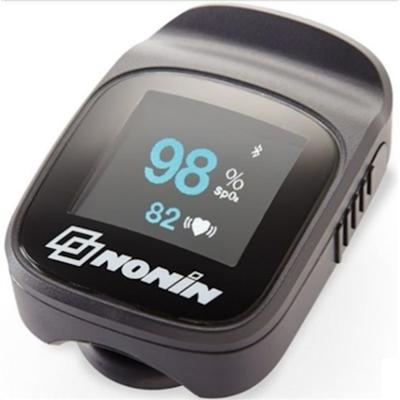
Nonin Medical NoninConnect™ Finger Pulse Oximeter with Bluetooth® Smart Wireless Technology""" NoninConnect™ Finger Pulse Oximeter with Bluetooth® Smart Wireless Technology for Clinicians and Patients — Nonin TruO2® OTC 3250 (OTC, No Prescription Required) The NoninConnect™ finger pulse oximeter is an over-the-counter (OTC) device , made..."299,00 $*Shipping: 0,00 $Secure redirect to the provider
-
How do I activate wireless connectivity in Windows 7?
To activate wireless connectivity in Windows 7, you can follow these steps: 1. Click on the Start button and then select Control Panel. 2. In the Control Panel, click on Network and Sharing Center. 3. In the Network and Sharing Center, click on the "Change adapter settings" option on the left-hand side. 4. Right-click on the wireless network connection and select "Enable" from the drop-down menu. Once you have completed these steps, your wireless connectivity should be activated and you should be able to connect to available wireless networks. **
-
To which incorrect commands does the universal remote control device respond?
The universal remote control device responds to incorrect commands such as pressing the wrong button, entering the wrong code, or using a command that is not compatible with the device being controlled. It may also respond to commands that are not recognized or programmed into its system. In general, the universal remote control will not respond to commands that are not within its programmed capabilities. **
-
What can be done if the Samsung Smart TV does not respond?
If a Samsung Smart TV is not responding, there are a few troubleshooting steps that can be taken. First, try turning the TV off and on again to see if that resolves the issue. If that doesn't work, check the batteries in the remote control and replace them if necessary. Additionally, make sure the TV is properly connected to the power source and that all cables are securely plugged in. If the issue persists, it may be helpful to reset the TV to its factory settings or contact Samsung customer support for further assistance. **
-
Please respond quickly.
Of course! I am here to assist you promptly. Please let me know how I can help you. **
* All prices are inclusive of VAT and, if applicable, plus shipping costs. The offer information is based on the details provided by the respective shop and is updated through automated processes. Real-time updates do not occur, so deviations can occur in individual cases. ** Note: Parts of this content were created by AI.