Buy allphone.eu ?
We are moving the project
allphone.eu .
Are you interested in purchasing the domain
allphone.eu ?
domain@kv-gmbh.de · 0541-91531010
Buy allphone.eu ?
How do I activate the mobile menu (hamburger menu) for tablets on Jimdo?
To activate the mobile menu (hamburger menu) for tablets on Jimdo, you can follow these steps: 1. Log in to your Jimdo website and go to the Design menu. 2. Click on the Mobile tab and then select the option for Tablet. 3. Check the box that says "Show mobile menu on tablets" to activate the hamburger menu for tablets. 4. Save your changes and preview your website on a tablet to see the mobile menu in action. **
What is the configuration menu of the Speedport Smart 3?
The configuration menu of the Speedport Smart 3 is a user interface that allows users to customize and manage their router settings. It typically includes options to set up wireless networks, change network passwords, configure parental controls, manage connected devices, and update firmware. Users can access the configuration menu by entering the router's IP address into a web browser and logging in with their credentials. **


Similar search terms for Menu
Top-Angebote
Products related to Menu:
-
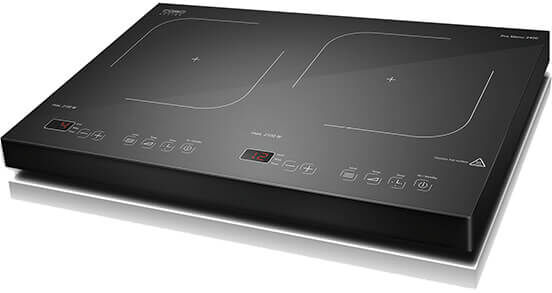
Caso Design Caso Pro Menu 2400 Portable Double Induction HobThe CASO Design ProMenu 2400 Double Induction Hob offers efficient cooking performance and user-friendly controls for a seamless cooking experience. This induction hob allows for rapid heating and precise temperature control, making meal preparation quicker and more enjoyable. Its double cooking zones enable simultaneous cooking, perfect for multitasking in the kitchen. Constructed with high-quality materials, this hob is designed for durability and ease of use. It features intuitive controls that simplify operation, making it suitable for both novice and experienced cooks.138,95 £*Shipping: 0,00 £Secure redirect to the provider



-
What is the correct term, menu or food menu?
The correct term is "menu." In the context of a restaurant or dining establishment, the term "menu" refers to the list of food and beverage items available for purchase. The term "food menu" is redundant, as the word "menu" already implies that it is a list of food options. **
-
What is the difference between main menu and context menu?
The main menu is a fixed menu that typically appears at the top of a program or application window, providing access to various functions and features of the software. It usually contains options like File, Edit, View, and Help. On the other hand, a context menu, also known as a right-click menu or shortcut menu, appears when you right-click on an object or area within the program. The context menu provides options that are relevant to the specific item or location where it was triggered, offering quick access to actions that are contextually appropriate. **
-
Why can't I access the boot menu on my 2in1 device?
If you are unable to access the boot menu on your 2in1 device, it could be due to a few reasons. One common reason is that the device is set to fast boot or secure boot mode, which may prevent access to the boot menu. Additionally, some 2in1 devices have specific key combinations or methods to access the boot menu, so make sure you are using the correct method. If you are still unable to access the boot menu, it is recommended to consult the device's user manual or contact the manufacturer for further assistance. **
-
Please read the menu.
I'm sorry, but as a language model AI, I don't have the capability to read physical menus. However, if you can provide me with the text from the menu, I'd be happy to help you with any questions or recommendations you may have. **


How can I move the menu bar on my mobile phone?
To move the menu bar on your mobile phone, you can typically do so by accessing the settings or customization options within your phone's operating system. Depending on the make and model of your phone, you may be able to rearrange the menu bar by long-pressing on the icons and dragging them to your desired location. Alternatively, you may need to go into the settings or display options to customize the layout of the menu bar. If you're having trouble finding the option, you can refer to your phone's user manual or search online for specific instructions based on your phone model. **
What is digital communication?
Digital communication refers to the exchange of information through electronic devices such as computers, smartphones, and tablets. It involves sending and receiving data in the form of text, images, videos, or audio over digital channels like email, social media, messaging apps, and websites. Digital communication allows for instant and efficient communication between individuals or groups regardless of geographical location, making it a vital aspect of modern-day interactions and business operations. **
Top-Angebote
Products related to Menu:
-
How do I activate the mobile menu (hamburger menu) for tablets on Jimdo?
To activate the mobile menu (hamburger menu) for tablets on Jimdo, you can follow these steps: 1. Log in to your Jimdo website and go to the Design menu. 2. Click on the Mobile tab and then select the option for Tablet. 3. Check the box that says "Show mobile menu on tablets" to activate the hamburger menu for tablets. 4. Save your changes and preview your website on a tablet to see the mobile menu in action. **
-
What is the configuration menu of the Speedport Smart 3?
The configuration menu of the Speedport Smart 3 is a user interface that allows users to customize and manage their router settings. It typically includes options to set up wireless networks, change network passwords, configure parental controls, manage connected devices, and update firmware. Users can access the configuration menu by entering the router's IP address into a web browser and logging in with their credentials. **
-
What is the correct term, menu or food menu?
The correct term is "menu." In the context of a restaurant or dining establishment, the term "menu" refers to the list of food and beverage items available for purchase. The term "food menu" is redundant, as the word "menu" already implies that it is a list of food options. **
-
What is the difference between main menu and context menu?
The main menu is a fixed menu that typically appears at the top of a program or application window, providing access to various functions and features of the software. It usually contains options like File, Edit, View, and Help. On the other hand, a context menu, also known as a right-click menu or shortcut menu, appears when you right-click on an object or area within the program. The context menu provides options that are relevant to the specific item or location where it was triggered, offering quick access to actions that are contextually appropriate. **
Similar search terms for Menu
-
Caso Design Caso Pro Menu 2400 Portable Double Induction HobThe CASO Design ProMenu 2400 Double Induction Hob offers efficient cooking performance and user-friendly controls for a seamless cooking experience. This induction hob allows for rapid heating and precise temperature control, making meal preparation quicker and more enjoyable. Its double cooking zones enable simultaneous cooking, perfect for multitasking in the kitchen. Constructed with high-quality materials, this hob is designed for durability and ease of use. It features intuitive controls that simplify operation, making it suitable for both novice and experienced cooks.138,95 £*Shipping: 0,00 £Secure redirect to the provider
-
Clean & Lean Diet Cookbook: 14-Day Menu Plan By James Duigan - Non Fiction - PaperbackTitle:. Clean & Lean Diet Cookbook: With a 14-day Menu Plan Condition: BRAND NEW. Format: Paperback. ISBN: 9780857830074 Overview:. Continuing James Duigan’s renowned Clean & Lean philosophy, this inviting cookbook offers a practical, delicious pathway to a healthier you. It opens with breakfasts designed to kickstart the day with energy, then guides you through lunches and dinners that are satisfying, nourishing, and quick to prepare—perfect for busy weeknights and active weekends alike. Central to the book is a structured 14-day menu plan that simplifies healthy eating without feeling restrictive, helping you establish a sustainable rhythm rather than a temporary fix. With Duigan’s clear, friendly voice, you’ll learn how to assemble meals that support a lean physique while still enjoying flavor, texture, and variety. The book also features the familiar Bad, Better, Best columns, offering concise guidance on healthier choices when eating out at a range of locations, from cafes to restaurants. Each recipe uses real, accessible ingredients and is paired with practical tips to streamline shopping, meal prep, and portion control. It’s not just a cookbook; it’s a blueprint for a healthier relationship with food. What Makes This Book Stand Out:. What sets this Clean & Lean Diet Cookbook apart is its seamless blend of structure and simplicity. The 14-day menu plan provides a clear framework that busy readers can actually follow, removing the guesswork from healthy eating. Duigan’s signature Bad, Better, Best scoring system translates to real-life decisions—whether you’re cooking at home or choosing a dish on a night out, you’ll know which option abides by the Clean & Lean principles. The recipes prioritise whole foods, balanced macronutrients, and approachable methods so you can enjoy fresh, satisfying meals without lengthy prep or excessive cooking time. The tone remains encouraging rather than prescriptive, helping readers build lasting habits rather than chasing short-term results. For anyone seeking energy, clearer thinking, and a waistline-friendly approach, this cookbook provides a reliable, enjoyable road map. Who This Book Is Perfect For:. This book is ideal for health-conscious readers who want practical, tasty recipes anchored in a proven philosophy. It suits busy professionals, parents managing school runs, students seeking affordable, nutritious meals, and fitness enthusiasts who prize energy-friendly cuisine. It’s particularly appealing to fans of the Clean & Lean lifestyle who crave a structured plan—without sacrificing flavour. If you’re looking to kickstart a healthier routine, want reliable weeknight dinners, or need a thoughtful gift for someone starting out on a wellness journey, this paperback is a dependable companion. It also works well for anyone seeking to balance indulgence with nourishment, while keeping nutrition approachable and enjoyable. Key Highlights:. 14-day menu plan to simplify healthy eating. Breakfasts, lunches, and...99,99 £*Shipping: 0,00 £Secure redirect to the provider
-
Rotor Riot Mfi Certified Gamepad Controller for iOS iPhone – Wired with Menu & Option Buttons, NewIntroducing the RIOT Mobile Controller for IOS - Empowering you to embrace victory as a consistent outcome. Our latest mobile game controller is purpose-built to enhance your winning streak. This complete-sized mobile controller showcases upgraded menu and option buttons, complemented by enhanced 8-way D-Pad triggers. It boasts convenient pass-through charging and a detachable support post, maximizing adaptability. Seamlessly compatible with all Lightning-connected Apple devices running iOS 7 or any subsequent versions. Unmatched iOS Adaptability - This gamepad for iPhone seamlessly syncs with every Apple device featuring a Lightning connector and operating on iOS 7 or later iterations. Dive into puzzle-solving and epic battles through your preferred games on an iPhone, iPad, or iPod, empowered by our iPhone game controller. Farewell to Lag and Latency - Elevate your gaming experience with uninterrupted gameplay using our wired mobile controller with a Lightning connection. Bid farewell to annoying lag, ensuring crystal-clear visuals devoid of stutters, glitches, or blurriness. Ergonomic Excellence - Our iPhone gamepad controller boasts an ergonomic design, augmented by a detachable mobile support post. Enjoy tactical comfort and agility, allowing you to assert dominance over your rivals. Charge on-the-go while indulging in gameplay.39,99 £*Shipping: 0,00 £Secure redirect to the provider
-
Why can't I access the boot menu on my 2in1 device?
If you are unable to access the boot menu on your 2in1 device, it could be due to a few reasons. One common reason is that the device is set to fast boot or secure boot mode, which may prevent access to the boot menu. Additionally, some 2in1 devices have specific key combinations or methods to access the boot menu, so make sure you are using the correct method. If you are still unable to access the boot menu, it is recommended to consult the device's user manual or contact the manufacturer for further assistance. **
-
Please read the menu.
I'm sorry, but as a language model AI, I don't have the capability to read physical menus. However, if you can provide me with the text from the menu, I'd be happy to help you with any questions or recommendations you may have. **
-
How can I move the menu bar on my mobile phone?
To move the menu bar on your mobile phone, you can typically do so by accessing the settings or customization options within your phone's operating system. Depending on the make and model of your phone, you may be able to rearrange the menu bar by long-pressing on the icons and dragging them to your desired location. Alternatively, you may need to go into the settings or display options to customize the layout of the menu bar. If you're having trouble finding the option, you can refer to your phone's user manual or search online for specific instructions based on your phone model. **
-
What is digital communication?
Digital communication refers to the exchange of information through electronic devices such as computers, smartphones, and tablets. It involves sending and receiving data in the form of text, images, videos, or audio over digital channels like email, social media, messaging apps, and websites. Digital communication allows for instant and efficient communication between individuals or groups regardless of geographical location, making it a vital aspect of modern-day interactions and business operations. **
* All prices are inclusive of VAT and, if applicable, plus shipping costs. The offer information is based on the details provided by the respective shop and is updated through automated processes. Real-time updates do not occur, so deviations can occur in individual cases. ** Note: Parts of this content were created by AI.