Buy allphone.eu ?
We are moving the project
allphone.eu .
Are you interested in purchasing the domain
allphone.eu ?
domain@kv-gmbh.de · 0541-91531010
Buy allphone.eu ?
What is an endoscope for drain pipes?
An endoscope for drain pipes is a specialized tool used to inspect the interior of drain pipes. It consists of a long, flexible tube with a camera and light at one end, allowing for visual inspection of the inside of the pipes. This tool is used to identify blockages, leaks, or other issues within the drain system without the need for costly and invasive excavation. It is commonly used by plumbers and maintenance professionals to diagnose and address drainage problems. **
How can I use a USB endoscope with Linux?
To use a USB endoscope with Linux, you will need to first connect the endoscope to your computer using the USB cable. Then, you may need to install any necessary drivers or software for the endoscope to work properly. Once the endoscope is connected and recognized by your Linux system, you can use software such as Cheese, VLC, or GUVCView to view the live feed from the endoscope camera. Make sure to adjust the camera settings within the software to get the best image quality. **


Similar search terms for Endoscope
Top-Angebote
Products related to Endoscope:
-
Tools, Home & Hobby Pipeline Inspection Camera, Sewer Camera, Waterproof Borescope With LED Lights, Industrial Endoscope Pipeline Inspection Camera, Sewer Camera, Waterproof Borescope With LED Lights, Industrial EndoscopeClear 4.3 Color TFT LCD Screen for Precise Inspection Experience detailed and vibrant visuals with the 164FT 4.3 screen sewer camera. Its 1200TVL TFT LCD monitor delivers sharp, colorful images, making it easier to detect blockages, cracks, or...444,97 $*Shipping: 0,00 $Secure redirect to the provider
-
Multicon Wholesale Hub Endoscope, Camera Inspection Tool With APP Control, Waterproof Borescope For Engine, Spark Plug & Pipe Inspection Endoscope, Camera Inspection Tool With APP Control, Waterproof Borescope For Engine, Spark Plug & Pipe InspectionDiscover the convenience of inspecting tight spaces and hardtoreach areas with the 1920P HD Endoscope Camera. Designed for professionals and DIY enthusiasts, this versatile borescope tool is your goto solution for inspecting everything from engine...69,97 $*Shipping: 0,00 $Secure redirect to the provider
-
Inspired Deals Kids Endoscope Camera With 2.4 Inch Screen, IP67 Waterproof Borescope For Nature Exploration G21Turn everyday outdoor adventures into exciting discoveries with a nature exploration camera made for curious young minds. The G21 lets children peek into tree holes, bird nests, crevices, ponds, fish tanks, and other hardtosee spaces while viewing...66,97 $*Shipping: 0,00 $Secure redirect to the provider
-
Steelplay MetalTech Radian Wireless Gaming Headset - Wireless and Wired Connectivity, Detachable Microphone, Volume ControlsThe Steelplay MetalTech Radian wireless gaming headset offers flexible audio for gaming and everyday entertainment. It's designed for use across consoles, computers, and compatible mobile devices. You can connect wirelessly through the supplied low-latency USB-C dongle or use the detachable 3.5 mm braided cable for a wired connection. The headset features a comfortable, adaptable design with soft ear cushions and an adjustable padded headband for a secure fit during longer gaming, music, and film sessions. The detachable boom microphone supports in-game chat and can be removed when not required. Key features include wireless and wired connectivity, a supplied USB-C dongle for compatible devices, a detachable microphone for flexible voice chat, integrated volume and microphone controls, and a detachable 2 m braided 3.5 mm audio cable. The headset also includes a 1.5 m braided USB-C charging cable and is compatible with PS5, PS4, Nintendo Switch, PC, Mac, and compatible Android or iOS devices using the supplied dongle.26,99 £*Shipping: 3,95 £Secure redirect to the provider


-
What is a endoscope camera and what do I need it for?
An endoscope camera is a medical device that consists of a long, thin, flexible tube with a camera and light source at the tip. It is used to visually examine the interior of a hollow organ or cavity in the body, such as the digestive tract, respiratory system, or urinary system. Endoscope cameras are commonly used for diagnostic purposes, such as identifying abnormalities, taking tissue samples, or performing certain medical procedures, like removing polyps or stones. They are also used for minimally invasive surgeries, allowing surgeons to see inside the body without making large incisions. **
-
What is digital communication?
Digital communication refers to the exchange of information through electronic devices such as computers, smartphones, and tablets. It involves sending and receiving data in the form of text, images, videos, or audio over digital channels like email, social media, messaging apps, and websites. Digital communication allows for instant and efficient communication between individuals or groups regardless of geographical location, making it a vital aspect of modern-day interactions and business operations. **
-
How do I activate wireless connectivity in Windows 7?
To activate wireless connectivity in Windows 7, you can follow these steps: 1. Click on the Start button and then select Control Panel. 2. In the Control Panel, click on Network and Sharing Center. 3. In the Network and Sharing Center, click on the "Change adapter settings" option on the left-hand side. 4. Right-click on the wireless network connection and select "Enable" from the drop-down menu. Once you have completed these steps, your wireless connectivity should be activated and you should be able to connect to available wireless networks. **
-
Is the wireless communication WLAN disabled?
To determine if the wireless communication WLAN is disabled, you can check the settings on your device. Look for the WLAN or Wi-Fi settings and see if the option is turned off or disabled. Additionally, you can also check the physical hardware of your device to see if there is a manual switch or button to enable or disable the WLAN. If the WLAN is disabled, you can enable it through the settings or by using the physical switch or button. **

What is Digital Technology 2?
Digital Technology 2 is a course that builds upon the foundational concepts introduced in Digital Technology 1. It delves deeper into topics such as programming, web development, data analysis, and cybersecurity. Students will further develop their skills in using digital tools and technologies to solve real-world problems and gain a more advanced understanding of how technology impacts society. The course aims to prepare students for a career in the rapidly evolving field of digital technology. **
What are the connectivity issues of the Logitech G Pro Wireless?
The Logitech G Pro Wireless mouse has been known to have occasional connectivity issues such as intermittent disconnections or lag spikes. Some users have reported issues with the wireless signal dropping out, especially in crowded wireless environments. These problems can be frustrating during gaming sessions where a stable connection is crucial. However, firmware updates and ensuring there is no interference from other wireless devices can help mitigate these connectivity issues. **
Top-Angebote
Products related to Endoscope:
-
Tools, Home & Hobby Pipeline Inspection Camera, Sewer Camera, Waterproof Borescope With LED Lights, Industrial Endoscope Pipeline Inspection Camera, Sewer Camera, Waterproof Borescope With LED Lights, Industrial EndoscopeClear 4.3 Color TFT LCD Screen for Precise Inspection Experience detailed and vibrant visuals with the 164FT 4.3 screen sewer camera. Its 1200TVL TFT LCD monitor delivers sharp, colorful images, making it easier to detect blockages, cracks, or...444,97 $*Shipping: 0,00 $Secure redirect to the provider
-
Multicon Wholesale Hub Endoscope, Camera Inspection Tool With APP Control, Waterproof Borescope For Engine, Spark Plug & Pipe Inspection Endoscope, Camera Inspection Tool With APP Control, Waterproof Borescope For Engine, Spark Plug & Pipe InspectionDiscover the convenience of inspecting tight spaces and hardtoreach areas with the 1920P HD Endoscope Camera. Designed for professionals and DIY enthusiasts, this versatile borescope tool is your goto solution for inspecting everything from engine...69,97 $*Shipping: 0,00 $Secure redirect to the provider
-
What is an endoscope for drain pipes?
An endoscope for drain pipes is a specialized tool used to inspect the interior of drain pipes. It consists of a long, flexible tube with a camera and light at one end, allowing for visual inspection of the inside of the pipes. This tool is used to identify blockages, leaks, or other issues within the drain system without the need for costly and invasive excavation. It is commonly used by plumbers and maintenance professionals to diagnose and address drainage problems. **
-
How can I use a USB endoscope with Linux?
To use a USB endoscope with Linux, you will need to first connect the endoscope to your computer using the USB cable. Then, you may need to install any necessary drivers or software for the endoscope to work properly. Once the endoscope is connected and recognized by your Linux system, you can use software such as Cheese, VLC, or GUVCView to view the live feed from the endoscope camera. Make sure to adjust the camera settings within the software to get the best image quality. **
-
What is a endoscope camera and what do I need it for?
An endoscope camera is a medical device that consists of a long, thin, flexible tube with a camera and light source at the tip. It is used to visually examine the interior of a hollow organ or cavity in the body, such as the digestive tract, respiratory system, or urinary system. Endoscope cameras are commonly used for diagnostic purposes, such as identifying abnormalities, taking tissue samples, or performing certain medical procedures, like removing polyps or stones. They are also used for minimally invasive surgeries, allowing surgeons to see inside the body without making large incisions. **
-
What is digital communication?
Digital communication refers to the exchange of information through electronic devices such as computers, smartphones, and tablets. It involves sending and receiving data in the form of text, images, videos, or audio over digital channels like email, social media, messaging apps, and websites. Digital communication allows for instant and efficient communication between individuals or groups regardless of geographical location, making it a vital aspect of modern-day interactions and business operations. **
Similar search terms for Endoscope
-
Inspired Deals Kids Endoscope Camera With 2.4 Inch Screen, IP67 Waterproof Borescope For Nature Exploration G21Turn everyday outdoor adventures into exciting discoveries with a nature exploration camera made for curious young minds. The G21 lets children peek into tree holes, bird nests, crevices, ponds, fish tanks, and other hardtosee spaces while viewing...66,97 $*Shipping: 0,00 $Secure redirect to the provider
-
Steelplay MetalTech Radian Wireless Gaming Headset - Wireless and Wired Connectivity, Detachable Microphone, Volume ControlsThe Steelplay MetalTech Radian wireless gaming headset offers flexible audio for gaming and everyday entertainment. It's designed for use across consoles, computers, and compatible mobile devices. You can connect wirelessly through the supplied low-latency USB-C dongle or use the detachable 3.5 mm braided cable for a wired connection. The headset features a comfortable, adaptable design with soft ear cushions and an adjustable padded headband for a secure fit during longer gaming, music, and film sessions. The detachable boom microphone supports in-game chat and can be removed when not required. Key features include wireless and wired connectivity, a supplied USB-C dongle for compatible devices, a detachable microphone for flexible voice chat, integrated volume and microphone controls, and a detachable 2 m braided 3.5 mm audio cable. The headset also includes a 1.5 m braided USB-C charging cable and is compatible with PS5, PS4, Nintendo Switch, PC, Mac, and compatible Android or iOS devices using the supplied dongle.26,99 £*Shipping: 3,95 £Secure redirect to the provider
-
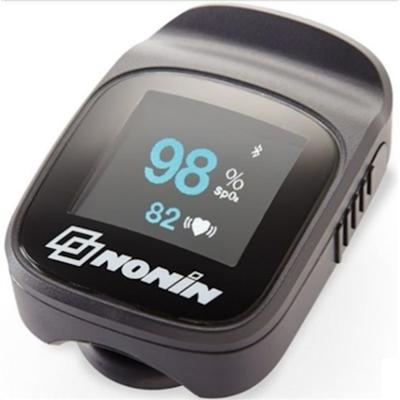
Nonin Medical NoninConnect™ Finger Pulse Oximeter with Bluetooth® Smart Wireless Technology""" NoninConnect™ Finger Pulse Oximeter with Bluetooth® Smart Wireless Technology for Clinicians and Patients — Nonin TruO2® OTC 3250 (OTC, No Prescription Required) The NoninConnect™ finger pulse oximeter is an over-the-counter (OTC) device , made..."299,00 $*Shipping: 0,00 $Secure redirect to the provider
-
The Handy Homestead DIY Wooden Walkie Talkie Kit For Kids STEM Building Wireless Communication Toy DIY Wooden Walkie Talkie Kit For Kids STEM Building Wireless Communication ToySpark your childs I built this! moment with a handson project that turns curiosity into real play. This 2pcs DIY wooden walkie talkie kit lets kids assemble two working communication toys while exploring basic electronics, sound, and signal...54,97 $*Shipping: 0,00 $Secure redirect to the provider
-
How do I activate wireless connectivity in Windows 7?
To activate wireless connectivity in Windows 7, you can follow these steps: 1. Click on the Start button and then select Control Panel. 2. In the Control Panel, click on Network and Sharing Center. 3. In the Network and Sharing Center, click on the "Change adapter settings" option on the left-hand side. 4. Right-click on the wireless network connection and select "Enable" from the drop-down menu. Once you have completed these steps, your wireless connectivity should be activated and you should be able to connect to available wireless networks. **
-
Is the wireless communication WLAN disabled?
To determine if the wireless communication WLAN is disabled, you can check the settings on your device. Look for the WLAN or Wi-Fi settings and see if the option is turned off or disabled. Additionally, you can also check the physical hardware of your device to see if there is a manual switch or button to enable or disable the WLAN. If the WLAN is disabled, you can enable it through the settings or by using the physical switch or button. **
-
What is Digital Technology 2?
Digital Technology 2 is a course that builds upon the foundational concepts introduced in Digital Technology 1. It delves deeper into topics such as programming, web development, data analysis, and cybersecurity. Students will further develop their skills in using digital tools and technologies to solve real-world problems and gain a more advanced understanding of how technology impacts society. The course aims to prepare students for a career in the rapidly evolving field of digital technology. **
-
What are the connectivity issues of the Logitech G Pro Wireless?
The Logitech G Pro Wireless mouse has been known to have occasional connectivity issues such as intermittent disconnections or lag spikes. Some users have reported issues with the wireless signal dropping out, especially in crowded wireless environments. These problems can be frustrating during gaming sessions where a stable connection is crucial. However, firmware updates and ensuring there is no interference from other wireless devices can help mitigate these connectivity issues. **
* All prices are inclusive of VAT and, if applicable, plus shipping costs. The offer information is based on the details provided by the respective shop and is updated through automated processes. Real-time updates do not occur, so deviations can occur in individual cases. ** Note: Parts of this content were created by AI.