Buy allphone.eu ?
We are moving the project
allphone.eu .
Are you interested in purchasing the domain
allphone.eu ?
domain@kv-gmbh.de · 0541-91531010
Buy allphone.eu ?
How can I downgrade Vodafone?
To downgrade your Vodafone plan, you can contact Vodafone customer service either by phone or through their website. Explain to them that you would like to downgrade your current plan and they will guide you through the process. Keep in mind that there may be certain terms and conditions associated with downgrading your plan, so it's best to check with Vodafone directly for the specific details. **
How can you downgrade iPadOS 13.5.1?
To downgrade iPadOS 13.5.1, you will need to have the previous version of iPadOS firmware file saved on your computer. You will also need to have the latest version of iTunes installed. Connect your iPad to your computer, put it into recovery mode, and then select the option to restore it using the firmware file you have saved. Follow the on-screen instructions to complete the downgrade process. Keep in mind that downgrading iPadOS can lead to data loss, so it's important to back up your device before proceeding. **


Similar search terms for Downgrade
Top-Angebote
Products related to Downgrade:
-
SWISSTEN 22071510 Charger Device, mobile communicationPlug Type: Schuko; Connectors/Plugs: USB type-C, USB; Charge Mode: GaN, PD; Overcharging protection: Yes; Overheating protection: Yes; Short Circuit Protection: Yes; Colour: black; Number of inlets/outlets: 2; Power [W]: 126,59 £*Shipping: 8,45 £Secure redirect to the provider
-
HyperX Pulsefire Fuse Wireless Gaming Mouse – Lightweight RGB Gaming Mouse with Dual Wireless ConnectivityOverview The HyperX Pulsefire Fuse Wireless Gaming Mouse is designed for gamers who want precision, comfort, and wireless freedom. Featuring a lightweight frame and microline grip textured panels, this gaming mouse provides excellent control during fast-paced gameplay. With customisable DPI presets, dual wireless connectivity, and RGB lighting control through HyperX NGENUITY software, the Pulsefire Fuse delivers responsive performance and personalised gaming settings. Its ergonomic design ensures comfortable use for extended gaming sessions while maintaining reliable wireless performance. Key Features Dual Wireless Connectivity – Connect via low-latency 2.4GHz wireless or Bluetooth for flexible gaming setups. Lightweight Gaming Design – Built for fast movement and improved control during gameplay. Microline Grip Textured Panels – Enhanced grip for better accuracy and stability. Customisable DPI Presets – Adjust sensitivity settings to suit different gaming styles. RGB Lighting Effects – Personalise lighting with custom RGB settings. HyperX NGENUITY Software Support – Configure DPI levels, button functions, and RGB lighting. High-Precision Gaming Sensor – Accurate tracking for competitive gameplay. Long Battery Life – Designed to support extended gaming sessions. Ergonomic Shape – Comfortable grip suitable for long hours of use. Benefits The HyperX Pulsefire Fuse Wireless Gaming Mouse provides gamers with responsive control and flexibility thanks to its dual wireless connectivity options. The lightweight build allows for quick movements and improved accuracy, while the textured grip panels ensure the mouse remains stable during intense gaming moments. Customisable DPI presets allow players to adjust sensitivity for different game genres, whether precision aiming in FPS games or fast movement in strategy and action titles. With RGB lighting customisation and HyperX NGENUITY software integration, users can personalise their setup to match their gaming style. Designed for comfort and reliability, the Pulsefire Fuse is an excellent choice for gamers who want wireless performance without compromising control. Specifications Specification Details Brand HyperX Model Pulsefire Fuse Wireless EAN / Barcode [Ean] Type Wireless Gaming Mouse Connectivity 2.4GHz Wireless / Bluetooth Sensor Type High Precision Gaming Sensor DPI Settings Customisable DPI Presets Lighting RGB Customisable Lighting Software HyperX NGENUITY Grip Microline Grip Textured Panels Design Lightweight Gaming Frame Buttons Programmable Buttons Battery Rechargeable / Long Battery Life Compatibility Windows PC34,00 £*Shipping: 0,00 £Secure redirect to the provider




-
How can I downgrade my Kindle?
To downgrade your Kindle, you will need to manually install an older version of the software. This process is not recommended by Amazon as it can cause issues with your device. You will need to find the specific software version you want to downgrade to, download it onto your computer, and then transfer it to your Kindle using a USB cable. Keep in mind that downgrading your Kindle may void your warranty and could potentially cause problems with the device's functionality. **
-
How can one downgrade iPadOS 13.5.1?
To downgrade iPadOS 13.5.1, you will need to have the previous version of iPadOS firmware file saved on your computer. You will also need to have iTunes installed on your computer. Connect your iPad to your computer, put it into recovery mode, and then select the option to restore the device in iTunes. When prompted, choose the firmware file of the previous version of iPadOS that you have saved on your computer. Follow the on-screen instructions to complete the downgrade process. **
-
Can I still downgrade my PS3?
Yes, it is still possible to downgrade a PS3, but it is a complex process and may void the warranty. Downgrading a PS3 involves installing custom firmware, which can allow the console to run older versions of the system software. However, it is important to note that downgrading a PS3 can also carry the risk of bricking the console if not done correctly. It is recommended to thoroughly research and understand the process before attempting to downgrade a PS3. **
-
How can I downgrade iOS 15.4?
To downgrade from iOS 15.4 to a previous version, you will need to have saved SHSH blobs for the version you want to downgrade to. Without these blobs, it is not possible to downgrade. You will also need to use a tool like iTunes or a third-party software like 3uTools to perform the downgrade process. Keep in mind that downgrading iOS versions can be risky and may result in data loss, so it's important to backup your device before attempting the downgrade. **

How can one downgrade iOS 17?
As of my knowledge cutoff in September 2021, iOS 17 has not been released. However, in general, downgrading iOS versions can be a complex process and may not be officially supported by Apple. It typically involves finding and downloading the specific older iOS version you want to install, putting your device into recovery mode, and using iTunes to restore the older iOS version. It's important to note that downgrading iOS can lead to data loss and may not be possible if Apple has stopped signing the older iOS version. It's always best to research and proceed with caution when attempting to downgrade iOS. **
How can I downgrade the Apple Watch?
To downgrade your Apple Watch, you will need to first unpair it from your iPhone. Then, you can use your iPhone to restore the previous watchOS version by downloading the appropriate firmware file and using iTunes or Finder to install it on your Apple Watch. Keep in mind that downgrading your Apple Watch may void your warranty and could potentially cause issues with the device's functionality. It's recommended to proceed with caution and make sure you have a backup of your data before attempting to downgrade. **
Top-Angebote
Products related to Downgrade:
-
How can I downgrade Vodafone?
To downgrade your Vodafone plan, you can contact Vodafone customer service either by phone or through their website. Explain to them that you would like to downgrade your current plan and they will guide you through the process. Keep in mind that there may be certain terms and conditions associated with downgrading your plan, so it's best to check with Vodafone directly for the specific details. **
-
How can you downgrade iPadOS 13.5.1?
To downgrade iPadOS 13.5.1, you will need to have the previous version of iPadOS firmware file saved on your computer. You will also need to have the latest version of iTunes installed. Connect your iPad to your computer, put it into recovery mode, and then select the option to restore it using the firmware file you have saved. Follow the on-screen instructions to complete the downgrade process. Keep in mind that downgrading iPadOS can lead to data loss, so it's important to back up your device before proceeding. **
-
How can I downgrade my Kindle?
To downgrade your Kindle, you will need to manually install an older version of the software. This process is not recommended by Amazon as it can cause issues with your device. You will need to find the specific software version you want to downgrade to, download it onto your computer, and then transfer it to your Kindle using a USB cable. Keep in mind that downgrading your Kindle may void your warranty and could potentially cause problems with the device's functionality. **
-
How can one downgrade iPadOS 13.5.1?
To downgrade iPadOS 13.5.1, you will need to have the previous version of iPadOS firmware file saved on your computer. You will also need to have iTunes installed on your computer. Connect your iPad to your computer, put it into recovery mode, and then select the option to restore the device in iTunes. When prompted, choose the firmware file of the previous version of iPadOS that you have saved on your computer. Follow the on-screen instructions to complete the downgrade process. **
Similar search terms for Downgrade
-
SWISSTEN 22071510 Charger Device, mobile communicationPlug Type: Schuko; Connectors/Plugs: USB type-C, USB; Charge Mode: GaN, PD; Overcharging protection: Yes; Overheating protection: Yes; Short Circuit Protection: Yes; Colour: black; Number of inlets/outlets: 2; Power [W]: 126,59 £*Shipping: 8,45 £Secure redirect to the provider
-
HyperX Pulsefire Fuse Wireless Gaming Mouse – Lightweight RGB Gaming Mouse with Dual Wireless ConnectivityOverview The HyperX Pulsefire Fuse Wireless Gaming Mouse is designed for gamers who want precision, comfort, and wireless freedom. Featuring a lightweight frame and microline grip textured panels, this gaming mouse provides excellent control during fast-paced gameplay. With customisable DPI presets, dual wireless connectivity, and RGB lighting control through HyperX NGENUITY software, the Pulsefire Fuse delivers responsive performance and personalised gaming settings. Its ergonomic design ensures comfortable use for extended gaming sessions while maintaining reliable wireless performance. Key Features Dual Wireless Connectivity – Connect via low-latency 2.4GHz wireless or Bluetooth for flexible gaming setups. Lightweight Gaming Design – Built for fast movement and improved control during gameplay. Microline Grip Textured Panels – Enhanced grip for better accuracy and stability. Customisable DPI Presets – Adjust sensitivity settings to suit different gaming styles. RGB Lighting Effects – Personalise lighting with custom RGB settings. HyperX NGENUITY Software Support – Configure DPI levels, button functions, and RGB lighting. High-Precision Gaming Sensor – Accurate tracking for competitive gameplay. Long Battery Life – Designed to support extended gaming sessions. Ergonomic Shape – Comfortable grip suitable for long hours of use. Benefits The HyperX Pulsefire Fuse Wireless Gaming Mouse provides gamers with responsive control and flexibility thanks to its dual wireless connectivity options. The lightweight build allows for quick movements and improved accuracy, while the textured grip panels ensure the mouse remains stable during intense gaming moments. Customisable DPI presets allow players to adjust sensitivity for different game genres, whether precision aiming in FPS games or fast movement in strategy and action titles. With RGB lighting customisation and HyperX NGENUITY software integration, users can personalise their setup to match their gaming style. Designed for comfort and reliability, the Pulsefire Fuse is an excellent choice for gamers who want wireless performance without compromising control. Specifications Specification Details Brand HyperX Model Pulsefire Fuse Wireless EAN / Barcode [Ean] Type Wireless Gaming Mouse Connectivity 2.4GHz Wireless / Bluetooth Sensor Type High Precision Gaming Sensor DPI Settings Customisable DPI Presets Lighting RGB Customisable Lighting Software HyperX NGENUITY Grip Microline Grip Textured Panels Design Lightweight Gaming Frame Buttons Programmable Buttons Battery Rechargeable / Long Battery Life Compatibility Windows PC34,00 £*Shipping: 0,00 £Secure redirect to the provider
-
Steelplay MetalTech Radian Wireless Gaming Headset - Wireless and Wired Connectivity, Detachable Microphone, Volume ControlsThe Steelplay MetalTech Radian wireless gaming headset offers flexible audio for gaming and everyday entertainment. It's designed for use across consoles, computers, and compatible mobile devices. You can connect wirelessly through the supplied low-latency USB-C dongle or use the detachable 3.5 mm braided cable for a wired connection. The headset features a comfortable, adaptable design with soft ear cushions and an adjustable padded headband for a secure fit during longer gaming, music, and film sessions. The detachable boom microphone supports in-game chat and can be removed when not required. Key features include wireless and wired connectivity, a supplied USB-C dongle for compatible devices, a detachable microphone for flexible voice chat, integrated volume and microphone controls, and a detachable 2 m braided 3.5 mm audio cable. The headset also includes a 1.5 m braided USB-C charging cable and is compatible with PS5, PS4, Nintendo Switch, PC, Mac, and compatible Android or iOS devices using the supplied dongle.26,99 £*Shipping: 3,95 £Secure redirect to the provider
-
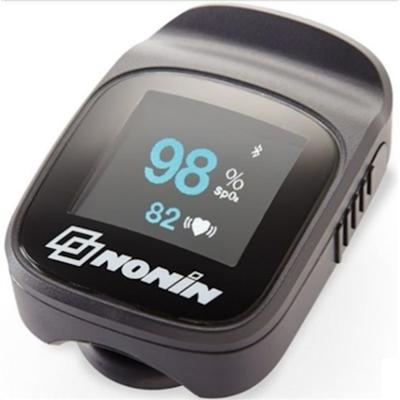
Nonin Medical NoninConnect™ Finger Pulse Oximeter with Bluetooth® Smart Wireless Technology""" NoninConnect™ Finger Pulse Oximeter with Bluetooth® Smart Wireless Technology for Clinicians and Patients — Nonin TruO2® OTC 3250 (OTC, No Prescription Required) The NoninConnect™ finger pulse oximeter is an over-the-counter (OTC) device , made..."299,00 $*Shipping: 0,00 $Secure redirect to the provider
-
Can I still downgrade my PS3?
Yes, it is still possible to downgrade a PS3, but it is a complex process and may void the warranty. Downgrading a PS3 involves installing custom firmware, which can allow the console to run older versions of the system software. However, it is important to note that downgrading a PS3 can also carry the risk of bricking the console if not done correctly. It is recommended to thoroughly research and understand the process before attempting to downgrade a PS3. **
-
How can I downgrade iOS 15.4?
To downgrade from iOS 15.4 to a previous version, you will need to have saved SHSH blobs for the version you want to downgrade to. Without these blobs, it is not possible to downgrade. You will also need to use a tool like iTunes or a third-party software like 3uTools to perform the downgrade process. Keep in mind that downgrading iOS versions can be risky and may result in data loss, so it's important to backup your device before attempting the downgrade. **
-
How can one downgrade iOS 17?
As of my knowledge cutoff in September 2021, iOS 17 has not been released. However, in general, downgrading iOS versions can be a complex process and may not be officially supported by Apple. It typically involves finding and downloading the specific older iOS version you want to install, putting your device into recovery mode, and using iTunes to restore the older iOS version. It's important to note that downgrading iOS can lead to data loss and may not be possible if Apple has stopped signing the older iOS version. It's always best to research and proceed with caution when attempting to downgrade iOS. **
-
How can I downgrade the Apple Watch?
To downgrade your Apple Watch, you will need to first unpair it from your iPhone. Then, you can use your iPhone to restore the previous watchOS version by downloading the appropriate firmware file and using iTunes or Finder to install it on your Apple Watch. Keep in mind that downgrading your Apple Watch may void your warranty and could potentially cause issues with the device's functionality. It's recommended to proceed with caution and make sure you have a backup of your data before attempting to downgrade. **
* All prices are inclusive of VAT and, if applicable, plus shipping costs. The offer information is based on the details provided by the respective shop and is updated through automated processes. Real-time updates do not occur, so deviations can occur in individual cases. ** Note: Parts of this content were created by AI.