Buy allphone.eu ?
We are moving the project
allphone.eu .
Are you interested in purchasing the domain
allphone.eu ?
domain@kv-gmbh.de · 0541-91531010
Buy allphone.eu ?
Why are autostart programs not displayed?
Autostart programs may not be displayed because they are set to run in the background without any user interface. These programs are designed to start automatically when the computer boots up, without requiring any action from the user. As a result, they do not need to be displayed in the list of running programs or applications. Autostart programs typically perform tasks such as system maintenance, security checks, or updating software in the background. **
How do I disable Discord's autostart?
To disable Discord's autostart, you can follow these steps: 1. Open Discord and click on the gear icon in the bottom left corner to open User Settings. 2. In the User Settings menu, go to the "Windows Settings" tab. 3. Under the "Windows Settings" tab, toggle off the option that says "Open Discord" to disable Discord's autostart. 4. Once you have disabled the autostart option, Discord will no longer launch automatically when you start your computer. **


Similar search terms for Autostart
Top-Angebote
Products related to Autostart:
-
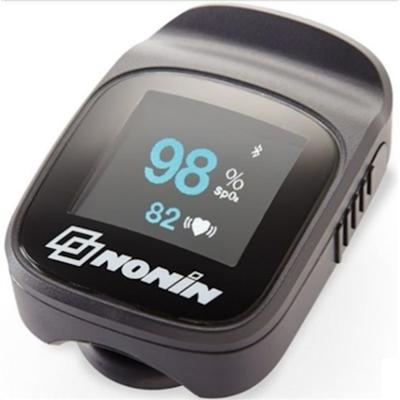
Nonin Medical NoninConnect™ Finger Pulse Oximeter with Bluetooth® Smart Wireless Technology""" NoninConnect™ Finger Pulse Oximeter with Bluetooth® Smart Wireless Technology for Clinicians and Patients — Nonin TruO2® OTC 3250 (OTC, No Prescription Required) The NoninConnect™ finger pulse oximeter is an over-the-counter (OTC) device , made..."299,00 $*Shipping: 0,00 $Secure redirect to the provider
-
Steelplay MetalTech Radian Wireless Gaming Headset - Wireless and Wired Connectivity, Detachable Microphone, Volume ControlsThe Steelplay MetalTech Radian wireless gaming headset offers flexible audio for gaming and everyday entertainment. It's designed for use across consoles, computers, and compatible mobile devices. You can connect wirelessly through the supplied low-latency USB-C dongle or use the detachable 3.5 mm braided cable for a wired connection. The headset features a comfortable, adaptable design with soft ear cushions and an adjustable padded headband for a secure fit during longer gaming, music, and film sessions. The detachable boom microphone supports in-game chat and can be removed when not required. Key features include wireless and wired connectivity, a supplied USB-C dongle for compatible devices, a detachable microphone for flexible voice chat, integrated volume and microphone controls, and a detachable 2 m braided 3.5 mm audio cable. The headset also includes a 1.5 m braided USB-C charging cable and is compatible with PS5, PS4, Nintendo Switch, PC, Mac, and compatible Android or iOS devices using the supplied dongle.26,99 £*Shipping: 3,95 £Secure redirect to the provider
-
On Spot Shop DC Wireless Remote Control Switch With Relay Output, RF Transmitter And Receiver For LED Lighting & Smart Device device With 1 RemoteReliable Control for Lighting & Automation Experience seamless control with the DC12V 8CH 8 Channel Wireless Remote Control LED Light Switch Relay Output Radio RF Transmitter and 315433 MHz Receiver. Designed for convenience, this system allows you...39,97 $*Shipping: 0,00 $Secure redirect to the provider
-
The Handy Homestead DIY Wooden Walkie Talkie Kit For Kids STEM Building Wireless Communication Toy DIY Wooden Walkie Talkie Kit For Kids STEM Building Wireless Communication ToySpark your childs I built this! moment with a handson project that turns curiosity into real play. This 2pcs DIY wooden walkie talkie kit lets kids assemble two working communication toys while exploring basic electronics, sound, and signal...54,97 $*Shipping: 0,00 $Secure redirect to the provider


-
Why are my autostart entries gone?
Your autostart entries may be gone due to several reasons such as a recent software update, a system crash, or a malware infection. It is also possible that the entries were accidentally deleted or disabled by a user. To restore your autostart entries, you can try checking your system settings, running a malware scan, or manually adding the necessary entries back. **
-
Why are autostart programs not being displayed?
Autostart programs may not be displayed for a few reasons. One possibility is that the autostart program list is being filtered or sorted in a way that is hiding certain programs. Another reason could be that the autostart program list is being overridden by a system or group policy that is preventing certain programs from being displayed. Additionally, some autostart programs may be hidden or disabled by default for security or performance reasons. It's also possible that the user does not have the necessary permissions to view or modify autostart programs. **
-
Is origin always reactivated in the autostart?
No, the origin is not always reactivated in the autostart. The autostart feature allows the program to automatically start when the system is booted up, but it does not necessarily mean that the origin will be reactivated every time. The autostart feature can be configured to start the program without reactivating the origin, depending on the settings and preferences of the user. **
-
Which programs do I need for autostart?
The programs you need for autostart depend on your specific needs and preferences. However, some common programs that people choose to have autostart include antivirus software, cloud storage services, messaging apps, and productivity tools. Additionally, you may want to have programs related to system maintenance and updates set to autostart to ensure your computer is always up to date and running smoothly. Ultimately, the programs you choose for autostart should align with your daily tasks and priorities. **


How can I enable the tvnserver in autostart?
To enable the tvnserver in autostart, you can create a script that starts the server upon system boot. You can do this by creating a systemd service file for tvnserver and placing it in the /etc/systemd/system/ directory. In the service file, you can specify the command to start the tvnserver and set it to start automatically by enabling the service using the systemctl command. This way, the tvnserver will start automatically every time the system boots up. **
How do I disable autostart apps in CMD?
To disable autostart apps in CMD, you can use the "msconfig" command. Open the Command Prompt as an administrator, then type "msconfig" and press Enter. In the System Configuration window that opens, go to the "Startup" tab and uncheck the apps you want to disable from automatically starting. Click "Apply" and then "OK" to save the changes. Finally, restart your computer for the changes to take effect. **
Top-Angebote
Products related to Autostart:
-
Nonin Medical NoninConnect™ Finger Pulse Oximeter with Bluetooth® Smart Wireless Technology""" NoninConnect™ Finger Pulse Oximeter with Bluetooth® Smart Wireless Technology for Clinicians and Patients — Nonin TruO2® OTC 3250 (OTC, No Prescription Required) The NoninConnect™ finger pulse oximeter is an over-the-counter (OTC) device , made..."299,00 $*Shipping: 0,00 $Secure redirect to the provider
-
Steelplay MetalTech Radian Wireless Gaming Headset - Wireless and Wired Connectivity, Detachable Microphone, Volume ControlsThe Steelplay MetalTech Radian wireless gaming headset offers flexible audio for gaming and everyday entertainment. It's designed for use across consoles, computers, and compatible mobile devices. You can connect wirelessly through the supplied low-latency USB-C dongle or use the detachable 3.5 mm braided cable for a wired connection. The headset features a comfortable, adaptable design with soft ear cushions and an adjustable padded headband for a secure fit during longer gaming, music, and film sessions. The detachable boom microphone supports in-game chat and can be removed when not required. Key features include wireless and wired connectivity, a supplied USB-C dongle for compatible devices, a detachable microphone for flexible voice chat, integrated volume and microphone controls, and a detachable 2 m braided 3.5 mm audio cable. The headset also includes a 1.5 m braided USB-C charging cable and is compatible with PS5, PS4, Nintendo Switch, PC, Mac, and compatible Android or iOS devices using the supplied dongle.26,99 £*Shipping: 3,95 £Secure redirect to the provider
-
Why are autostart programs not displayed?
Autostart programs may not be displayed because they are set to run in the background without any user interface. These programs are designed to start automatically when the computer boots up, without requiring any action from the user. As a result, they do not need to be displayed in the list of running programs or applications. Autostart programs typically perform tasks such as system maintenance, security checks, or updating software in the background. **
-
How do I disable Discord's autostart?
To disable Discord's autostart, you can follow these steps: 1. Open Discord and click on the gear icon in the bottom left corner to open User Settings. 2. In the User Settings menu, go to the "Windows Settings" tab. 3. Under the "Windows Settings" tab, toggle off the option that says "Open Discord" to disable Discord's autostart. 4. Once you have disabled the autostart option, Discord will no longer launch automatically when you start your computer. **
-
Why are my autostart entries gone?
Your autostart entries may be gone due to several reasons such as a recent software update, a system crash, or a malware infection. It is also possible that the entries were accidentally deleted or disabled by a user. To restore your autostart entries, you can try checking your system settings, running a malware scan, or manually adding the necessary entries back. **
-
Why are autostart programs not being displayed?
Autostart programs may not be displayed for a few reasons. One possibility is that the autostart program list is being filtered or sorted in a way that is hiding certain programs. Another reason could be that the autostart program list is being overridden by a system or group policy that is preventing certain programs from being displayed. Additionally, some autostart programs may be hidden or disabled by default for security or performance reasons. It's also possible that the user does not have the necessary permissions to view or modify autostart programs. **
Similar search terms for Autostart
-
On Spot Shop DC Wireless Remote Control Switch With Relay Output, RF Transmitter And Receiver For LED Lighting & Smart Device device With 1 RemoteReliable Control for Lighting & Automation Experience seamless control with the DC12V 8CH 8 Channel Wireless Remote Control LED Light Switch Relay Output Radio RF Transmitter and 315433 MHz Receiver. Designed for convenience, this system allows you...39,97 $*Shipping: 0,00 $Secure redirect to the provider
-
The Handy Homestead DIY Wooden Walkie Talkie Kit For Kids STEM Building Wireless Communication Toy DIY Wooden Walkie Talkie Kit For Kids STEM Building Wireless Communication ToySpark your childs I built this! moment with a handson project that turns curiosity into real play. This 2pcs DIY wooden walkie talkie kit lets kids assemble two working communication toys while exploring basic electronics, sound, and signal...54,97 $*Shipping: 0,00 $Secure redirect to the provider
-
Tools, Home & Hobby Automatic Pasta Maker Machine With Shapes & Smart Kneading Technology Automatic Pasta Maker Machine With Shapes & Smart Kneading TechnologyBring the joy of fresh, restaurantstyle pasta into your kitchen with this automatic pasta maker designed for busy families, home cooks, and pasta lovers alike. With intelligent onetouch operation and authentic kneading technology, this electric...174,97 $*Shipping: 0,00 $Secure redirect to the provider
-
Drop Dash Deals Phone Repair Tool Kit Precision Screwdriver Set For Smart Device Phone Repair Tool Kit Precision Screwdriver Set For Smart DeviceLooking for a reliable toolset to repair your iPhone or iPad The 14Piece iPhone Repair Tool Kit is designed to give you everything you need to safely and efficiently repair your Apple devices. Whether you're tackling screen replacements, battery...47,97 $*Shipping: 0,00 $Secure redirect to the provider
-
Is origin always reactivated in the autostart?
No, the origin is not always reactivated in the autostart. The autostart feature allows the program to automatically start when the system is booted up, but it does not necessarily mean that the origin will be reactivated every time. The autostart feature can be configured to start the program without reactivating the origin, depending on the settings and preferences of the user. **
-
Which programs do I need for autostart?
The programs you need for autostart depend on your specific needs and preferences. However, some common programs that people choose to have autostart include antivirus software, cloud storage services, messaging apps, and productivity tools. Additionally, you may want to have programs related to system maintenance and updates set to autostart to ensure your computer is always up to date and running smoothly. Ultimately, the programs you choose for autostart should align with your daily tasks and priorities. **
-
How can I enable the tvnserver in autostart?
To enable the tvnserver in autostart, you can create a script that starts the server upon system boot. You can do this by creating a systemd service file for tvnserver and placing it in the /etc/systemd/system/ directory. In the service file, you can specify the command to start the tvnserver and set it to start automatically by enabling the service using the systemctl command. This way, the tvnserver will start automatically every time the system boots up. **
-
How do I disable autostart apps in CMD?
To disable autostart apps in CMD, you can use the "msconfig" command. Open the Command Prompt as an administrator, then type "msconfig" and press Enter. In the System Configuration window that opens, go to the "Startup" tab and uncheck the apps you want to disable from automatically starting. Click "Apply" and then "OK" to save the changes. Finally, restart your computer for the changes to take effect. **
* All prices are inclusive of VAT and, if applicable, plus shipping costs. The offer information is based on the details provided by the respective shop and is updated through automated processes. Real-time updates do not occur, so deviations can occur in individual cases. ** Note: Parts of this content were created by AI.