Buy allphone.eu ?
We are moving the project
allphone.eu .
Are you interested in purchasing the domain
allphone.eu ?
domain@kv-gmbh.de · 0541-91531010
Buy allphone.eu ?
Where are speed cameras located on the A8 between the Leonberg interchange and the Stuttgart interchange?
Speed cameras are located on the A8 between the Leonberg interchange and the Stuttgart interchange in various locations along the route. They are typically placed in areas where speeding is a concern, such as construction zones, sharp curves, or areas with high accident rates. Drivers should be aware of speed limit signs and drive within the legal speed limits to avoid getting caught by these cameras. **
Where are the speed cameras located on the A8 between the Leonberg interchange and the Stuttgart interchange?
The speed cameras on the A8 between the Leonberg interchange and the Stuttgart interchange are located at various points along the highway. They are typically positioned in areas where speeding is a concern, such as construction zones, sharp curves, or areas with high accident rates. It is important for drivers to be aware of the speed limits and to drive safely in this area to avoid getting caught by the speed cameras. **


Similar search terms for Interchange
Top-Angebote
Products related to Interchange:
-
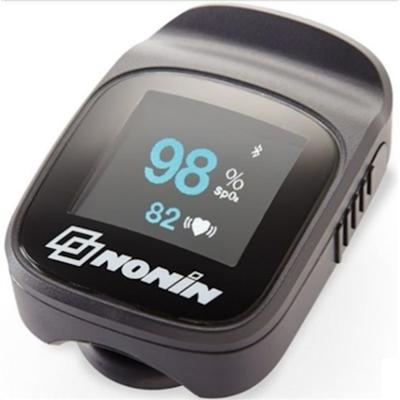
Nonin Medical NoninConnect™ Finger Pulse Oximeter with Bluetooth® Smart Wireless Technology""" NoninConnect™ Finger Pulse Oximeter with Bluetooth® Smart Wireless Technology for Clinicians and Patients — Nonin TruO2® OTC 3250 (OTC, No Prescription Required) The NoninConnect™ finger pulse oximeter is an over-the-counter (OTC) device , made..."299,00 $*Shipping: 0,00 $Secure redirect to the provider
-
Steelplay MetalTech Radian Wireless Gaming Headset - Wireless and Wired Connectivity, Detachable Microphone, Volume ControlsThe Steelplay MetalTech Radian wireless gaming headset offers flexible audio for gaming and everyday entertainment. It's designed for use across consoles, computers, and compatible mobile devices. You can connect wirelessly through the supplied low-latency USB-C dongle or use the detachable 3.5 mm braided cable for a wired connection. The headset features a comfortable, adaptable design with soft ear cushions and an adjustable padded headband for a secure fit during longer gaming, music, and film sessions. The detachable boom microphone supports in-game chat and can be removed when not required. Key features include wireless and wired connectivity, a supplied USB-C dongle for compatible devices, a detachable microphone for flexible voice chat, integrated volume and microphone controls, and a detachable 2 m braided 3.5 mm audio cable. The headset also includes a 1.5 m braided USB-C charging cable and is compatible with PS5, PS4, Nintendo Switch, PC, Mac, and compatible Android or iOS devices using the supplied dongle.26,99 £*Shipping: 3,95 £Secure redirect to the provider
-
On Spot Shop DC Wireless Remote Control Switch With Relay Output, RF Transmitter And Receiver For LED Lighting & Smart Device device With 1 RemoteReliable Control for Lighting & Automation Experience seamless control with the DC12V 8CH 8 Channel Wireless Remote Control LED Light Switch Relay Output Radio RF Transmitter and 315433 MHz Receiver. Designed for convenience, this system allows you...39,97 $*Shipping: 0,00 $Secure redirect to the provider
-
The Handy Homestead DIY Wooden Walkie Talkie Kit For Kids STEM Building Wireless Communication Toy DIY Wooden Walkie Talkie Kit For Kids STEM Building Wireless Communication ToySpark your childs I built this! moment with a handson project that turns curiosity into real play. This 2pcs DIY wooden walkie talkie kit lets kids assemble two working communication toys while exploring basic electronics, sound, and signal...54,97 $*Shipping: 0,00 $Secure redirect to the provider


-
How can one interchange the phases and masses in COB-LEDs?
To interchange the phases and masses in COB-LEDs, one would need to physically rearrange the placement of the LED chips within the package. This would involve carefully removing the existing chips and repositioning them in the desired configuration. It is important to note that this process requires precision and expertise to ensure that the COB-LED continues to function properly after the modification. Additionally, it is recommended to consult the manufacturer's guidelines or seek professional assistance when attempting to interchange phases and masses in COB-LEDs. **
-
How can one interchange the phase L and the neutral conductor N?
Interchanging the phase L and the neutral conductor N is not recommended as it can lead to dangerous electrical hazards. The phase conductor carries the live current, while the neutral conductor is meant to carry the return current. Switching them can cause an imbalance in the electrical system, leading to potential overloads, short circuits, and electrical fires. It is important to always consult a qualified electrician if there is a need to make any changes to the electrical wiring in a building. **
-
What is the speed limit on the A81 at the Stuttgart interchange heading towards Leonberg?
The speed limit on the A81 at the Stuttgart interchange heading towards Leonberg is typically 120 km/h. However, it's important to always check for any updated speed limit signs or regulations as they may change due to construction, weather conditions, or other factors. It's always best to drive at a safe and appropriate speed for the current road conditions. **
-
What is digital communication?
Digital communication refers to the exchange of information through electronic devices such as computers, smartphones, and tablets. It involves sending and receiving data in the form of text, images, videos, or audio over digital channels like email, social media, messaging apps, and websites. Digital communication allows for instant and efficient communication between individuals or groups regardless of geographical location, making it a vital aspect of modern-day interactions and business operations. **


Where is the speed camera located on the A46 towards the A1 at the Nord interchange?
The speed camera on the A46 towards the A1 at the Nord interchange is located just before the roundabout as you approach the A1. It is positioned on the left-hand side of the road, monitoring the speed of vehicles heading towards the A1. Drivers should be cautious and adhere to the speed limit in this area to avoid receiving a fine. **
How do I activate wireless connectivity in Windows 7?
To activate wireless connectivity in Windows 7, you can follow these steps: 1. Click on the Start button and then select Control Panel. 2. In the Control Panel, click on Network and Sharing Center. 3. In the Network and Sharing Center, click on the "Change adapter settings" option on the left-hand side. 4. Right-click on the wireless network connection and select "Enable" from the drop-down menu. Once you have completed these steps, your wireless connectivity should be activated and you should be able to connect to available wireless networks. **
Top-Angebote
Products related to Interchange:
-
Nonin Medical NoninConnect™ Finger Pulse Oximeter with Bluetooth® Smart Wireless Technology""" NoninConnect™ Finger Pulse Oximeter with Bluetooth® Smart Wireless Technology for Clinicians and Patients — Nonin TruO2® OTC 3250 (OTC, No Prescription Required) The NoninConnect™ finger pulse oximeter is an over-the-counter (OTC) device , made..."299,00 $*Shipping: 0,00 $Secure redirect to the provider
-
Steelplay MetalTech Radian Wireless Gaming Headset - Wireless and Wired Connectivity, Detachable Microphone, Volume ControlsThe Steelplay MetalTech Radian wireless gaming headset offers flexible audio for gaming and everyday entertainment. It's designed for use across consoles, computers, and compatible mobile devices. You can connect wirelessly through the supplied low-latency USB-C dongle or use the detachable 3.5 mm braided cable for a wired connection. The headset features a comfortable, adaptable design with soft ear cushions and an adjustable padded headband for a secure fit during longer gaming, music, and film sessions. The detachable boom microphone supports in-game chat and can be removed when not required. Key features include wireless and wired connectivity, a supplied USB-C dongle for compatible devices, a detachable microphone for flexible voice chat, integrated volume and microphone controls, and a detachable 2 m braided 3.5 mm audio cable. The headset also includes a 1.5 m braided USB-C charging cable and is compatible with PS5, PS4, Nintendo Switch, PC, Mac, and compatible Android or iOS devices using the supplied dongle.26,99 £*Shipping: 3,95 £Secure redirect to the provider
-
Where are speed cameras located on the A8 between the Leonberg interchange and the Stuttgart interchange?
Speed cameras are located on the A8 between the Leonberg interchange and the Stuttgart interchange in various locations along the route. They are typically placed in areas where speeding is a concern, such as construction zones, sharp curves, or areas with high accident rates. Drivers should be aware of speed limit signs and drive within the legal speed limits to avoid getting caught by these cameras. **
-
Where are the speed cameras located on the A8 between the Leonberg interchange and the Stuttgart interchange?
The speed cameras on the A8 between the Leonberg interchange and the Stuttgart interchange are located at various points along the highway. They are typically positioned in areas where speeding is a concern, such as construction zones, sharp curves, or areas with high accident rates. It is important for drivers to be aware of the speed limits and to drive safely in this area to avoid getting caught by the speed cameras. **
-
How can one interchange the phases and masses in COB-LEDs?
To interchange the phases and masses in COB-LEDs, one would need to physically rearrange the placement of the LED chips within the package. This would involve carefully removing the existing chips and repositioning them in the desired configuration. It is important to note that this process requires precision and expertise to ensure that the COB-LED continues to function properly after the modification. Additionally, it is recommended to consult the manufacturer's guidelines or seek professional assistance when attempting to interchange phases and masses in COB-LEDs. **
-
How can one interchange the phase L and the neutral conductor N?
Interchanging the phase L and the neutral conductor N is not recommended as it can lead to dangerous electrical hazards. The phase conductor carries the live current, while the neutral conductor is meant to carry the return current. Switching them can cause an imbalance in the electrical system, leading to potential overloads, short circuits, and electrical fires. It is important to always consult a qualified electrician if there is a need to make any changes to the electrical wiring in a building. **
Similar search terms for Interchange
-
On Spot Shop DC Wireless Remote Control Switch With Relay Output, RF Transmitter And Receiver For LED Lighting & Smart Device device With 1 RemoteReliable Control for Lighting & Automation Experience seamless control with the DC12V 8CH 8 Channel Wireless Remote Control LED Light Switch Relay Output Radio RF Transmitter and 315433 MHz Receiver. Designed for convenience, this system allows you...39,97 $*Shipping: 0,00 $Secure redirect to the provider
-
The Handy Homestead DIY Wooden Walkie Talkie Kit For Kids STEM Building Wireless Communication Toy DIY Wooden Walkie Talkie Kit For Kids STEM Building Wireless Communication ToySpark your childs I built this! moment with a handson project that turns curiosity into real play. This 2pcs DIY wooden walkie talkie kit lets kids assemble two working communication toys while exploring basic electronics, sound, and signal...54,97 $*Shipping: 0,00 $Secure redirect to the provider
-
Tools, Home & Hobby Automatic Pasta Maker Machine With Shapes & Smart Kneading Technology Automatic Pasta Maker Machine With Shapes & Smart Kneading TechnologyBring the joy of fresh, restaurantstyle pasta into your kitchen with this automatic pasta maker designed for busy families, home cooks, and pasta lovers alike. With intelligent onetouch operation and authentic kneading technology, this electric...174,97 $*Shipping: 0,00 $Secure redirect to the provider
-
Drop Dash Deals Phone Repair Tool Kit Precision Screwdriver Set For Smart Device Phone Repair Tool Kit Precision Screwdriver Set For Smart DeviceLooking for a reliable toolset to repair your iPhone or iPad The 14Piece iPhone Repair Tool Kit is designed to give you everything you need to safely and efficiently repair your Apple devices. Whether you're tackling screen replacements, battery...47,97 $*Shipping: 0,00 $Secure redirect to the provider
-
What is the speed limit on the A81 at the Stuttgart interchange heading towards Leonberg?
The speed limit on the A81 at the Stuttgart interchange heading towards Leonberg is typically 120 km/h. However, it's important to always check for any updated speed limit signs or regulations as they may change due to construction, weather conditions, or other factors. It's always best to drive at a safe and appropriate speed for the current road conditions. **
-
What is digital communication?
Digital communication refers to the exchange of information through electronic devices such as computers, smartphones, and tablets. It involves sending and receiving data in the form of text, images, videos, or audio over digital channels like email, social media, messaging apps, and websites. Digital communication allows for instant and efficient communication between individuals or groups regardless of geographical location, making it a vital aspect of modern-day interactions and business operations. **
-
Where is the speed camera located on the A46 towards the A1 at the Nord interchange?
The speed camera on the A46 towards the A1 at the Nord interchange is located just before the roundabout as you approach the A1. It is positioned on the left-hand side of the road, monitoring the speed of vehicles heading towards the A1. Drivers should be cautious and adhere to the speed limit in this area to avoid receiving a fine. **
-
How do I activate wireless connectivity in Windows 7?
To activate wireless connectivity in Windows 7, you can follow these steps: 1. Click on the Start button and then select Control Panel. 2. In the Control Panel, click on Network and Sharing Center. 3. In the Network and Sharing Center, click on the "Change adapter settings" option on the left-hand side. 4. Right-click on the wireless network connection and select "Enable" from the drop-down menu. Once you have completed these steps, your wireless connectivity should be activated and you should be able to connect to available wireless networks. **
* All prices are inclusive of VAT and, if applicable, plus shipping costs. The offer information is based on the details provided by the respective shop and is updated through automated processes. Real-time updates do not occur, so deviations can occur in individual cases. ** Note: Parts of this content were created by AI.