Buy allphone.eu ?
We are moving the project
allphone.eu .
Are you interested in purchasing the domain
allphone.eu ?
domain@kv-gmbh.de · 0541-91531010
Buy allphone.eu ?
What is digital communication?
Digital communication refers to the exchange of information through electronic devices such as computers, smartphones, and tablets. It involves sending and receiving data in the form of text, images, videos, or audio over digital channels like email, social media, messaging apps, and websites. Digital communication allows for instant and efficient communication between individuals or groups regardless of geographical location, making it a vital aspect of modern-day interactions and business operations. **
How do I activate wireless connectivity in Windows 7?
To activate wireless connectivity in Windows 7, you can follow these steps: 1. Click on the Start button and then select Control Panel. 2. In the Control Panel, click on Network and Sharing Center. 3. In the Network and Sharing Center, click on the "Change adapter settings" option on the left-hand side. 4. Right-click on the wireless network connection and select "Enable" from the drop-down menu. Once you have completed these steps, your wireless connectivity should be activated and you should be able to connect to available wireless networks. **


Similar search terms for Rehabilitate
Top-Angebote
Products related to Rehabilitate:
-
SWISSTEN 22071510 Charger Device, mobile communicationPlug Type: Schuko; Connectors/Plugs: USB type-C, USB; Charge Mode: GaN, PD; Overcharging protection: Yes; Overheating protection: Yes; Short Circuit Protection: Yes; Colour: black; Number of inlets/outlets: 2; Power [W]: 126,59 £*Shipping: 8,45 £Secure redirect to the provider
-
HyperX Pulsefire Fuse Wireless Gaming Mouse – Lightweight RGB Gaming Mouse with Dual Wireless ConnectivityOverview The HyperX Pulsefire Fuse Wireless Gaming Mouse is designed for gamers who want precision, comfort, and wireless freedom. Featuring a lightweight frame and microline grip textured panels, this gaming mouse provides excellent control during fast-paced gameplay. With customisable DPI presets, dual wireless connectivity, and RGB lighting control through HyperX NGENUITY software, the Pulsefire Fuse delivers responsive performance and personalised gaming settings. Its ergonomic design ensures comfortable use for extended gaming sessions while maintaining reliable wireless performance. Key Features Dual Wireless Connectivity – Connect via low-latency 2.4GHz wireless or Bluetooth for flexible gaming setups. Lightweight Gaming Design – Built for fast movement and improved control during gameplay. Microline Grip Textured Panels – Enhanced grip for better accuracy and stability. Customisable DPI Presets – Adjust sensitivity settings to suit different gaming styles. RGB Lighting Effects – Personalise lighting with custom RGB settings. HyperX NGENUITY Software Support – Configure DPI levels, button functions, and RGB lighting. High-Precision Gaming Sensor – Accurate tracking for competitive gameplay. Long Battery Life – Designed to support extended gaming sessions. Ergonomic Shape – Comfortable grip suitable for long hours of use. Benefits The HyperX Pulsefire Fuse Wireless Gaming Mouse provides gamers with responsive control and flexibility thanks to its dual wireless connectivity options. The lightweight build allows for quick movements and improved accuracy, while the textured grip panels ensure the mouse remains stable during intense gaming moments. Customisable DPI presets allow players to adjust sensitivity for different game genres, whether precision aiming in FPS games or fast movement in strategy and action titles. With RGB lighting customisation and HyperX NGENUITY software integration, users can personalise their setup to match their gaming style. Designed for comfort and reliability, the Pulsefire Fuse is an excellent choice for gamers who want wireless performance without compromising control. Specifications Specification Details Brand HyperX Model Pulsefire Fuse Wireless EAN / Barcode [Ean] Type Wireless Gaming Mouse Connectivity 2.4GHz Wireless / Bluetooth Sensor Type High Precision Gaming Sensor DPI Settings Customisable DPI Presets Lighting RGB Customisable Lighting Software HyperX NGENUITY Grip Microline Grip Textured Panels Design Lightweight Gaming Frame Buttons Programmable Buttons Battery Rechargeable / Long Battery Life Compatibility Windows PC34,00 £*Shipping: 0,00 £Secure redirect to the provider




-
Is there a profession in which one can rescue or rehabilitate dogs, or is it all done on a voluntary basis?
Yes, there are professions dedicated to rescuing and rehabilitating dogs. Animal shelters and rescue organizations often employ staff members who are responsible for the care and rehabilitation of dogs. Additionally, there are professional dog trainers and behaviorists who specialize in working with rescued or rehabilitated dogs to help them overcome behavioral issues and prepare them for adoption. These professionals may work for animal shelters, rescue organizations, or operate their own private practices. While there are many volunteers who contribute to the rescue and rehabilitation of dogs, there are also paid professionals who make it their career to help these animals. **
-
Is the wireless communication WLAN disabled?
To determine if the wireless communication WLAN is disabled, you can check the settings on your device. Look for the WLAN or Wi-Fi settings and see if the option is turned off or disabled. Additionally, you can also check the physical hardware of your device to see if there is a manual switch or button to enable or disable the WLAN. If the WLAN is disabled, you can enable it through the settings or by using the physical switch or button. **
-
What is Digital Technology 2?
Digital Technology 2 is a course that builds upon the foundational concepts introduced in Digital Technology 1. It delves deeper into topics such as programming, web development, data analysis, and cybersecurity. Students will further develop their skills in using digital tools and technologies to solve real-world problems and gain a more advanced understanding of how technology impacts society. The course aims to prepare students for a career in the rapidly evolving field of digital technology. **
-
What are the connectivity issues of the Logitech G Pro Wireless?
The Logitech G Pro Wireless mouse has been known to have occasional connectivity issues such as intermittent disconnections or lag spikes. Some users have reported issues with the wireless signal dropping out, especially in crowded wireless environments. These problems can be frustrating during gaming sessions where a stable connection is crucial. However, firmware updates and ensuring there is no interference from other wireless devices can help mitigate these connectivity issues. **

What is sensor technology and communication?
Sensor technology refers to the use of sensors to detect and measure physical properties such as temperature, pressure, light, and motion. These sensors can then communicate this information to other devices or systems through various communication methods such as wired connections, wireless signals, or the internet. This allows for real-time monitoring and control of physical environments, enabling applications in areas such as smart homes, industrial automation, healthcare, and environmental monitoring. Overall, sensor technology and communication play a crucial role in enabling the collection and transmission of data for various applications, ultimately leading to improved efficiency, safety, and convenience. **
Who knows the company Digital Innovation Ventures GmbH in Zug, Switzerland?
Digital Innovation Ventures GmbH in Zug, Switzerland is likely known by individuals in the tech industry, potential investors, business partners, and employees or former employees of the company. Additionally, local residents of Zug who are familiar with the business landscape in the area may also know of the company. **
Top-Angebote
Products related to Rehabilitate:
-
What is digital communication?
Digital communication refers to the exchange of information through electronic devices such as computers, smartphones, and tablets. It involves sending and receiving data in the form of text, images, videos, or audio over digital channels like email, social media, messaging apps, and websites. Digital communication allows for instant and efficient communication between individuals or groups regardless of geographical location, making it a vital aspect of modern-day interactions and business operations. **
-
How do I activate wireless connectivity in Windows 7?
To activate wireless connectivity in Windows 7, you can follow these steps: 1. Click on the Start button and then select Control Panel. 2. In the Control Panel, click on Network and Sharing Center. 3. In the Network and Sharing Center, click on the "Change adapter settings" option on the left-hand side. 4. Right-click on the wireless network connection and select "Enable" from the drop-down menu. Once you have completed these steps, your wireless connectivity should be activated and you should be able to connect to available wireless networks. **
-
Is there a profession in which one can rescue or rehabilitate dogs, or is it all done on a voluntary basis?
Yes, there are professions dedicated to rescuing and rehabilitating dogs. Animal shelters and rescue organizations often employ staff members who are responsible for the care and rehabilitation of dogs. Additionally, there are professional dog trainers and behaviorists who specialize in working with rescued or rehabilitated dogs to help them overcome behavioral issues and prepare them for adoption. These professionals may work for animal shelters, rescue organizations, or operate their own private practices. While there are many volunteers who contribute to the rescue and rehabilitation of dogs, there are also paid professionals who make it their career to help these animals. **
-
Is the wireless communication WLAN disabled?
To determine if the wireless communication WLAN is disabled, you can check the settings on your device. Look for the WLAN or Wi-Fi settings and see if the option is turned off or disabled. Additionally, you can also check the physical hardware of your device to see if there is a manual switch or button to enable or disable the WLAN. If the WLAN is disabled, you can enable it through the settings or by using the physical switch or button. **
Similar search terms for Rehabilitate
-
SWISSTEN 22071510 Charger Device, mobile communicationPlug Type: Schuko; Connectors/Plugs: USB type-C, USB; Charge Mode: GaN, PD; Overcharging protection: Yes; Overheating protection: Yes; Short Circuit Protection: Yes; Colour: black; Number of inlets/outlets: 2; Power [W]: 126,59 £*Shipping: 8,45 £Secure redirect to the provider
-
HyperX Pulsefire Fuse Wireless Gaming Mouse – Lightweight RGB Gaming Mouse with Dual Wireless ConnectivityOverview The HyperX Pulsefire Fuse Wireless Gaming Mouse is designed for gamers who want precision, comfort, and wireless freedom. Featuring a lightweight frame and microline grip textured panels, this gaming mouse provides excellent control during fast-paced gameplay. With customisable DPI presets, dual wireless connectivity, and RGB lighting control through HyperX NGENUITY software, the Pulsefire Fuse delivers responsive performance and personalised gaming settings. Its ergonomic design ensures comfortable use for extended gaming sessions while maintaining reliable wireless performance. Key Features Dual Wireless Connectivity – Connect via low-latency 2.4GHz wireless or Bluetooth for flexible gaming setups. Lightweight Gaming Design – Built for fast movement and improved control during gameplay. Microline Grip Textured Panels – Enhanced grip for better accuracy and stability. Customisable DPI Presets – Adjust sensitivity settings to suit different gaming styles. RGB Lighting Effects – Personalise lighting with custom RGB settings. HyperX NGENUITY Software Support – Configure DPI levels, button functions, and RGB lighting. High-Precision Gaming Sensor – Accurate tracking for competitive gameplay. Long Battery Life – Designed to support extended gaming sessions. Ergonomic Shape – Comfortable grip suitable for long hours of use. Benefits The HyperX Pulsefire Fuse Wireless Gaming Mouse provides gamers with responsive control and flexibility thanks to its dual wireless connectivity options. The lightweight build allows for quick movements and improved accuracy, while the textured grip panels ensure the mouse remains stable during intense gaming moments. Customisable DPI presets allow players to adjust sensitivity for different game genres, whether precision aiming in FPS games or fast movement in strategy and action titles. With RGB lighting customisation and HyperX NGENUITY software integration, users can personalise their setup to match their gaming style. Designed for comfort and reliability, the Pulsefire Fuse is an excellent choice for gamers who want wireless performance without compromising control. Specifications Specification Details Brand HyperX Model Pulsefire Fuse Wireless EAN / Barcode [Ean] Type Wireless Gaming Mouse Connectivity 2.4GHz Wireless / Bluetooth Sensor Type High Precision Gaming Sensor DPI Settings Customisable DPI Presets Lighting RGB Customisable Lighting Software HyperX NGENUITY Grip Microline Grip Textured Panels Design Lightweight Gaming Frame Buttons Programmable Buttons Battery Rechargeable / Long Battery Life Compatibility Windows PC34,00 £*Shipping: 0,00 £Secure redirect to the provider
-
Steelplay MetalTech Radian Wireless Gaming Headset - Wireless and Wired Connectivity, Detachable Microphone, Volume ControlsThe Steelplay MetalTech Radian wireless gaming headset offers flexible audio for gaming and everyday entertainment. It's designed for use across consoles, computers, and compatible mobile devices. You can connect wirelessly through the supplied low-latency USB-C dongle or use the detachable 3.5 mm braided cable for a wired connection. The headset features a comfortable, adaptable design with soft ear cushions and an adjustable padded headband for a secure fit during longer gaming, music, and film sessions. The detachable boom microphone supports in-game chat and can be removed when not required. Key features include wireless and wired connectivity, a supplied USB-C dongle for compatible devices, a detachable microphone for flexible voice chat, integrated volume and microphone controls, and a detachable 2 m braided 3.5 mm audio cable. The headset also includes a 1.5 m braided USB-C charging cable and is compatible with PS5, PS4, Nintendo Switch, PC, Mac, and compatible Android or iOS devices using the supplied dongle.26,99 £*Shipping: 3,95 £Secure redirect to the provider
-
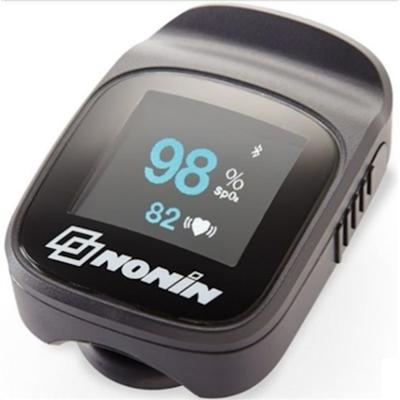
Nonin Medical NoninConnect™ Finger Pulse Oximeter with Bluetooth® Smart Wireless Technology""" NoninConnect™ Finger Pulse Oximeter with Bluetooth® Smart Wireless Technology for Clinicians and Patients — Nonin TruO2® OTC 3250 (OTC, No Prescription Required) The NoninConnect™ finger pulse oximeter is an over-the-counter (OTC) device , made..."299,00 $*Shipping: 0,00 $Secure redirect to the provider
-
What is Digital Technology 2?
Digital Technology 2 is a course that builds upon the foundational concepts introduced in Digital Technology 1. It delves deeper into topics such as programming, web development, data analysis, and cybersecurity. Students will further develop their skills in using digital tools and technologies to solve real-world problems and gain a more advanced understanding of how technology impacts society. The course aims to prepare students for a career in the rapidly evolving field of digital technology. **
-
What are the connectivity issues of the Logitech G Pro Wireless?
The Logitech G Pro Wireless mouse has been known to have occasional connectivity issues such as intermittent disconnections or lag spikes. Some users have reported issues with the wireless signal dropping out, especially in crowded wireless environments. These problems can be frustrating during gaming sessions where a stable connection is crucial. However, firmware updates and ensuring there is no interference from other wireless devices can help mitigate these connectivity issues. **
-
What is sensor technology and communication?
Sensor technology refers to the use of sensors to detect and measure physical properties such as temperature, pressure, light, and motion. These sensors can then communicate this information to other devices or systems through various communication methods such as wired connections, wireless signals, or the internet. This allows for real-time monitoring and control of physical environments, enabling applications in areas such as smart homes, industrial automation, healthcare, and environmental monitoring. Overall, sensor technology and communication play a crucial role in enabling the collection and transmission of data for various applications, ultimately leading to improved efficiency, safety, and convenience. **
-
Who knows the company Digital Innovation Ventures GmbH in Zug, Switzerland?
Digital Innovation Ventures GmbH in Zug, Switzerland is likely known by individuals in the tech industry, potential investors, business partners, and employees or former employees of the company. Additionally, local residents of Zug who are familiar with the business landscape in the area may also know of the company. **
* All prices are inclusive of VAT and, if applicable, plus shipping costs. The offer information is based on the details provided by the respective shop and is updated through automated processes. Real-time updates do not occur, so deviations can occur in individual cases. ** Note: Parts of this content were created by AI.